Beta BIOS for MPG X870E CARBON WIFI

Beta BIOS/FW/Software

Svet

🛠️ ⚙️⚒️
ADMIN
Joined
Nov 20, 2003
Messages
86,008
>>> E7E49AMSI.1A1E <<<

>>> E7E49AMSI.1A1H <<<

>>> E7E49AMSI.1A21 <<<

>>> E7E49AMSI.1A22 <<<

>>> E7E49AMSI.1A24 <<<

>>> E7E49AMSI.1A25 <<<

>>> E7E49AMSI.1A26 <<<

>>> E7E49AMSI.1A28 <<<

>>> E7E49AMSI.1A29 <<<

>>> E7E49AMSI.1A31 <<<

>>> E7E49AMSI.1A32 <<<

>>> E7E49AMSI.1A33 <<<

>>> E7E49AMSI.1A34 <<<

>>> E7E49AMSI.1A41 <<<

>>> E7E49AMSI.1A44 <<<

Notes:
  • * Unstable RAM OC
  • * Hang 0D when saving BIOS settings or doing M-Flash

>>> E7E49AMSI.1A62 <<<

>>> E7E49AMSI.1A65 <<<

>>> E7E49AMSI.1A66 <<<

>>> E7E49AMSI.1A93 <<<

>>> E7E49AMSI.1A99 <<<

.rar SHA-256: 0da3ebedfa9e1f53f3e3aa320c1fd32f770cae0b32f112fe87750f1f88031487
BIOS SHA-256: 07a227bb302e9eac43bca0e18a43cfe58e043302eebfb13b08c7b8653a8ad636


>>> E7E49AMSI.1AA1 <<<

.rar SHA-256: cf63c3ad59580532257612b108db651ec3341a517c22efb20127dd44c94d8ae1
BIOS SHA-256: 4BD52D73DE3112768E2C6C62CA85C423F0963359A4C4B1CFCFEF1C04294DE1D2

AGESA version:
Screenshot 2026-06-06 162546.jpg


>>> E7E49AMSI.1A9B <<<

.rar SHA-256: 9eae3f5df43c2696e64ef329c6fddc45ba2e40ec0b529a9c451fa3871b077bff
BIOS SHA-256: 2B34A9B25DDEC186AC2272334DC2666C80082B143468A4D9D470BE88AB2C4CB4

AGESA version:
1.jpg


>>> E7E49AMSI.1AA2 <<<

.rar SHA-256: 3e1eec8ecdd717f7b694f7a82e704d4fb7ef54ad4f357fe5e28de6b9de422473
BIOS SHA-256: B1172777823B553168B6B1A14C57CAF7E7B48C259EBC43586B39C2A9BC4C8542

AGESA version:
E7E49AMSI.1AA2_ver.jpg


Latest version: (from msi web page)
7E49v1AA3:
BIOS SHA-256: AF55A578CBDE8138906094F1CAD8C4C6A06639C4DAB23C0D7ACEA392326847AA
AGESA version:
Screenshot 2026-07-03 145909.jpg


>>> E7E49AMSI.1AA4 <<<

.rar SHA-256: 501a027d7cc8d1016f0164a0e7ec5a5f1cf39a32c13ad90af2c70e3dc90bfce2
BIOS SHA-256: 2A98DA827D82FF800397AF901680995D5481DC7DE8D62BAB6890DB9119C472F7

AGESA version:
agesa.jpg


Latest version: (from msi web page)
7E49v1AA7:
BIOS SHA-256: 060DCBFB7B80454820B56418A55255BEF9E79686C6CF43D1522D015AA5B82CFE
AGESA version:
Screenshot 2026-09-23 003104.jpg


FYI:
With >>Forum UEFI Shell Flash & Patch Tool<<
you can copy the generated hash of the BIOS file quickly,
by loading the BIOS and click over BIOS-SHA256 on the bottom:

2.jpg
then in this topic you can do press CTRL+F in your web browser,
paste the contents to check if will match it.

Aside from this you can check AGESA version of the BIOS File,
and / or let the tool prepare the USB key for flashing
either by the tool by booting from USB key or by M-Flash.

While doing USB key preparation with the tool,
it will ensure the BIOS File's integrity on the USB key of both Checksum and SHA256.
This also will ensure your USB key used is not damaged or corrupted prior flashing
regardless of the flashing method.
_

 
Last edited:
I'll agree and put in my vote for A64 as well. Sadly, the PCIe speed issue still exists for some of us, but with Spread Spectrum enabled, it's very rare and I haven't seen it drop to 2.1 in a very long time. I do see the occasional drop after resume sleep to v4, but usually sleeping and re-waking the computer again resolves it.
 
I took the risk and tried E7E49AMSI.1A79, and so far there are no issues. Right from the start after the upgrade, the BIOS felt normal and the mouse was responsive, so the unexplained mouse lag in BIOS from 75, I think it was, is gone. All my settings work without question, and the memory is properly detected and set for Kingston Fury Renegade 36CL 8000 at XMP1 8000. Performance-wise, it’s the same as A64, which in my case was the best performing BIOS, so nothing lost and everything works as intended.
Whatever they did they definitely fixed things, and it is AGESA1.2.8.0
 
Feedback on BIOS A.79 - Excellent Stability with 9800X3D and Tight RAM Timings

Hello everyone,
I wanted to share my positive experience with the latest BIOS version A.79 (AGESA 1.2.8.0) for my motherboard paired with a Ryzen 7 9800X3D CPU.
After extensive testing and meticulous tuning I can confirm that this BIOS version provides exceptional stability and allows for very aggressive memory timings on Hynix kits.
Specifically I have achieved rock-solid stability with my DDR5 6000MT/s memory running at manually tightened timingst CL 30, tRCD 36, tRP 36, tRAS 76, tRC 112, tRDRDSD 1, tREFI 65535.
For voltages I have manually set the following values to ensure long term stability: VSOC set to 1.2500V, CPU VDDIO set to 1.250V.
Furthermore I am running my Ryzen 7 9800X3D with a Curve Optimizer of -20 on all cores. The system has passed stability tests and performs exceptionally well under heavy load maintaining high boost clocks while staying within safe voltage limits.
Overall BIOS A.79 appears to be a very mature and stable release for the X870E Carbon Wifi platform allowing to reach peak performance without the typical memory training issues

Best regards
 
Last edited:
Feedback on BIOS A.79 - Excellent Stability with 9800X3D and Tight RAM Timings

Hello everyone,
I wanted to share my positive experience with the latest BIOS version A.79 (AGESA 1.2.8.0) for my motherboard paired with a Ryzen 7 9800X3D CPU.
After extensive testing and meticulous tuning I can confirm that this BIOS version provides exceptional stability and allows for very aggressive memory timings on Hynix kits.
Specifically I have achieved rock-solid stability with my DDR5 6000MT/s memory running at manually tightened timingst CL 30, tRCD 36, tRP 36, tRAS 76, tRC 112, tRDRDSD 1, tREFI 65535.
For voltages I have manually set the following values to ensure long term stability: VSOC set to 1.2500V, CPU VDDIO set to 1.250V.
Furthermore I am running my Ryzen 7 9800X3D with a Curve Optimizer of -20 on all cores. The system has passed stability tests and performs exceptionally well under heavy load maintaining high boost clocks while staying within safe voltage limits.
Overall BIOS A.79 appears to be a very mature and stable release for the X870E Carbon Wifi platform allowing to reach peak performance without the typical memory training issues

Best regards
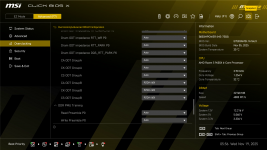
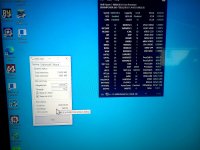
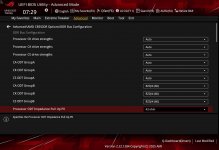
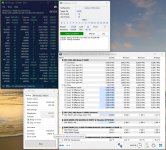
Hi guys, can anyone you confirm GroupB is visible now on Agesa 1.2.8.0, pls share a Bios screenshot, it supposed to be in DDR BUS config UEFI, like with MPower or Asus AYW which is benefit with 6000C26 A-die mem sticks, cuz only way i did able to run 8400GearOFF is with CA CK CS=60 & ODT 43 trick manually values inserted
 

Attachments

  • 1763529439383.png
    1763529439383.png
    578.7 KB · Views: 161
  • IMG_20251220_072136.jpg
    IMG_20251220_072136.jpg
    745.6 KB · Views: 156
  • 250902072932_copy_1576x1080.jpg
    250902072932_copy_1576x1080.jpg
    157.5 KB · Views: 154
  • IMG-20251129-WA0000.jpg
    IMG-20251129-WA0000.jpg
    600.5 KB · Views: 141
  • IMG_20251205_064635.jpg
    IMG_20251205_064635.jpg
    1.5 MB · Views: 167
Last edited:
Hi guys, can anyone you confirm GroupB is visible now on Agesa 1.2.8.0, pls share a Bios screenshot, it supposed to be in DDR BUS config UEFI, like with MPower or Asus AYW which is benefit with 6000C26 A-die mem sticks, cuz only way i did able to run 8400GearOFF is with CA CK CS=60 & ODT 43 trick manually values inserted
Yes, certainly. Here you go:
MSI_Advanced DRAM Co_[2025-12-20-11-21-55].png
 
What BIOS has everyone had the best luck with?
@jankmail15af02e1 Are you able to just go back to a BIOS prior to A71?
Finally I can reverted back to A64 with remove peripheral (processor,memory,my dac, gpu) just motherboards and PSU and then flash via usb with file MSI.ROM[press flash bios button].
Any bios AGESA 1.2.0.3i because AGESA 1.2.8.0 not working to 9800x3d with 128gb KLEVV CRASS V RGB 6400 (4x32GB) 4 full slots.
==============================================

RDSEED Failure on AMD “Zen 5” Processors​

ComboAM5PI 1.2.0.3i/1.2.8.0
https://www.amd.com/en/resources/product-security/bulletin/amd-sb-7055.html
 
I had to go back to 64 my video card slot would downclock never had the problem before only way to fix it was to restart. did a bios flashback to 64. I did not remove any parts .
 
Last edited:
Back
Top