Beta BIOS for MPG X870E CARBON WIFI

Beta BIOS/FW/Software

Svet

🛠️ ⚙️⚒️
ADMIN
Joined
Nov 20, 2003
Messages
85,990
>>> E7E49AMSI.1A1E <<<

>>> E7E49AMSI.1A1H <<<

>>> E7E49AMSI.1A21 <<<

>>> E7E49AMSI.1A22 <<<

>>> E7E49AMSI.1A24 <<<

>>> E7E49AMSI.1A25 <<<

>>> E7E49AMSI.1A26 <<<

>>> E7E49AMSI.1A28 <<<

>>> E7E49AMSI.1A29 <<<

>>> E7E49AMSI.1A31 <<<

>>> E7E49AMSI.1A32 <<<

>>> E7E49AMSI.1A33 <<<

>>> E7E49AMSI.1A34 <<<

>>> E7E49AMSI.1A41 <<<

>>> E7E49AMSI.1A44 <<<

Notes:
  • * Unstable RAM OC
  • * Hang 0D when saving BIOS settings or doing M-Flash

>>> E7E49AMSI.1A62 <<<

>>> E7E49AMSI.1A65 <<<

>>> E7E49AMSI.1A66 <<<

>>> E7E49AMSI.1A93 <<<

>>> E7E49AMSI.1A99 <<<

.rar SHA-256: 0da3ebedfa9e1f53f3e3aa320c1fd32f770cae0b32f112fe87750f1f88031487
BIOS SHA-256: 07a227bb302e9eac43bca0e18a43cfe58e043302eebfb13b08c7b8653a8ad636


>>> E7E49AMSI.1AA1 <<<

.rar SHA-256: cf63c3ad59580532257612b108db651ec3341a517c22efb20127dd44c94d8ae1
BIOS SHA-256: 4BD52D73DE3112768E2C6C62CA85C423F0963359A4C4B1CFCFEF1C04294DE1D2

AGESA version:
Screenshot 2026-06-06 162546.jpg


>>> E7E49AMSI.1A9B <<<

.rar SHA-256: 9eae3f5df43c2696e64ef329c6fddc45ba2e40ec0b529a9c451fa3871b077bff
BIOS SHA-256: 2B34A9B25DDEC186AC2272334DC2666C80082B143468A4D9D470BE88AB2C4CB4

AGESA version:
1.jpg


>>> E7E49AMSI.1AA2 <<<

.rar SHA-256: 3e1eec8ecdd717f7b694f7a82e704d4fb7ef54ad4f357fe5e28de6b9de422473
BIOS SHA-256: B1172777823B553168B6B1A14C57CAF7E7B48C259EBC43586B39C2A9BC4C8542

AGESA version:
E7E49AMSI.1AA2_ver.jpg


Latest version: (from msi web page)
7E49v1AA3:
BIOS SHA-256: AF55A578CBDE8138906094F1CAD8C4C6A06639C4DAB23C0D7ACEA392326847AA
AGESA version:
Screenshot 2026-07-03 145909.jpg


>>> E7E49AMSI.1AA4 <<<

.rar SHA-256: 501a027d7cc8d1016f0164a0e7ec5a5f1cf39a32c13ad90af2c70e3dc90bfce2
BIOS SHA-256: 2A98DA827D82FF800397AF901680995D5481DC7DE8D62BAB6890DB9119C472F7

AGESA version:
agesa.jpg


Latest version: (from msi web page)
7E49v1AA7:
BIOS SHA-256: 060DCBFB7B80454820B56418A55255BEF9E79686C6CF43D1522D015AA5B82CFE
AGESA version:
Screenshot 2026-09-23 003104.jpg


FYI:
With >>Forum UEFI Shell Flash & Patch Tool<<
you can copy the generated hash of the BIOS file quickly,
by loading the BIOS and click over BIOS-SHA256 on the bottom:

2.jpg
then in this topic you can do press CTRL+F in your web browser,
paste the contents to check if will match it.

Aside from this you can check AGESA version of the BIOS File,
and / or let the tool prepare the USB key for flashing
either by the tool by booting from USB key or by M-Flash.

While doing USB key preparation with the tool,
it will ensure the BIOS File's integrity on the USB key of both Checksum and SHA256.
This also will ensure your USB key used is not damaged or corrupted prior flashing
regardless of the flashing method.
_

 
Last edited:
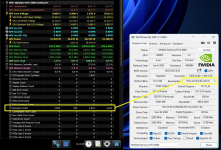
I did some testing.... Summary: As already mentioned, when the PCIe-bug occurs, performance is very slow and unstable, and image errors may occur (mentioned here and HWL). This can be seen in particular in HWinfo under GPU --> PCIe Recovery Count, which then goes crazy and shoots up abnormally in seconds/ few minutes.

1773069946734.png
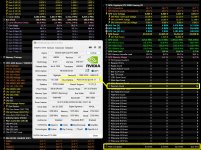
Under normal circumstances, the PCIe interface switches to save power and the recovery count counts in a typical range (only if load is applied or not). As soon as a load (gaming, benchmark etc.) is applied, the PCIe interface remains in the highest mode. In my case it's PCIe x16 5.0 (32.0 GB/s). You can also see this in HWInfo under PCIe Link Speed.

GPU-Z PCIe.jpg
I activated the iGPU just to test it, even if I didn't have anything connected to it. Result: the 5080 can only be used up to PCIe 4.0. I thought that perhaps there might be issues with this setting when the iGPU is disabled. However, disabling the iGPU still seem to be the recommended setting.

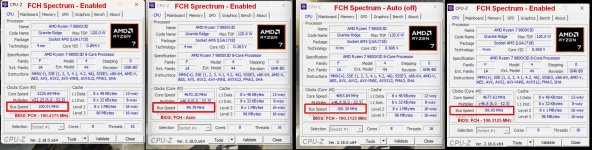
When checking the bus clock, there is a difference between HWinfo and CPU-Z. CPU-Z displays the actual (fluctuating) bus clock, while HWinfo only displays the setting (as in the BIOS). This is particularly interesting with FCH Spectrum on, because the bus clock behaves differently in combination with a manually set bus clock setting and FCH Spectrum on.

CPU-Z Bus.jpg

I always used the AIDA stability test (stress CPU, FPU, cache, system memory) to check/test the bus clock settings. Interestingly, all 16 lanes in HWinfo report massive errors (255) in the GPU when I test with a bus clock of 100.3125 MHz and FCH Spectrum Auto (off) and the PCIe link speed stuck on PCIe 3.0 (maybe an error handling, idk). Possible behavior when messing around with the bus clock. With FCH Spectrum on and 100.3125 MHz HWinfo shows no PCIe lane errors.

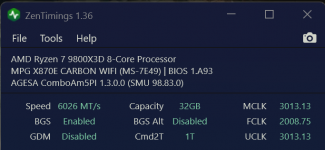
The steps for the bus clock are in +625 steps (100.3125 --> 100.3750 --> 100.4375 --> 100.5000 --> 100.6250 --> 100.6875 and so on). With FCH Spectrum on and bus clock set to Auto, the bus clock fluctuates mostly, from 99.70 to 99.90. I've now tested various combinations. Sweet spot seems to be a bus clock of 100.4375 MHz, because with FCH Spectrum on, the bus clock is almost always at 100.00 MHz according to CPU-Z. HWinfo says 100.3 MHz, which results in a slightly increased RAM speed, FCKL, core clock, etc.

1773072330291.png

AIDA stress test looks stable so far with bus clock speed of 100.4375 MHz and gaming benchmarks (CPU limit) were also most consistent with this setting.
 
I remember back when I was moding gigabyte motherboards fch was hidden and it was turn on and some people wanted me to turn it off from them .and gigabyte would set the bus to 100.3 didn't really think much of it at the time.And I did not have the problem untill the new bios was drop . So for me I leave my computer off all night and I work in the morning when I come home from work it would downclock.it has been about a month now and have not seen it . Fch on and 100.3. but I am only one person. So it might not work for everyone.
 
I have the Carbon WIFI, MSI RTX5090 Liquid SOC, three NVMe drives (one 5th gen, two 4th gen), and a Creative Labs AE-5, and ever since I bought these components and put them to work, even with the factory BIOS, I’ve never experienced any lane degradation in any way, especially not for the GPU. I’m not saying this doesn’t occur, but I think the real issue lies with faulty boards containing dodgy elements that either degrade quickly or are defective from the start. MSI doesn’t seem to care, and all such boards should be RMA’d only then will MSI take the matter seriously.
 
I think the next time I mean next amd upgrade I do I will go back to gigabyte board again next year it was a so bad because this board is good other then this issue. For now fch and 100.3 works so I just set it and forget it ni aways run hwinfo and afterburner so I can see what it is doing.
 
I think the next time I mean next amd upgrade I do I will go back to gigabyte board again next year
I had such unexplained issues with the MSI MEG X57E and X570E MAX, both ACE boards, and they drove me nuts, which made me switch to Intel, only to end up in another mess with the i9-1400K. However, this system now on the Carbon WIFI is one of the most stable and best-performing systems in the past couple of years. Still, reading about the issues people have experienced, along with my own experience during the 3950X and 5950X era and the X570E ACE and MAX , makes me doubt the quality of MSI boards, as even the GODLIKE is plagued with problems.
 
I just noticed that AMD released a new chipset driver update today. I wanted to share it here for anyone looking to keep their MSI board up to date.
  • Revision Number: 8.02.18.557
  • Release Date: March 9, 2026
  • File Size: 63 MB
You can find the download on the official AMD support page. It is usually a good idea to update if you want the best stability and performance on the latest Windows builds.
Hope this helps someone.
 
Just a little info A93 don't not fix the pci bug.
Same here. That's why I wrote that I hope they'll fix the PCIe issue on the Carbon Wi-Fi as well.

For now fch and 100.3 works so I just set it and forget it ni aways run hwinfo and afterburner so I can see what it is doing.
Btw, I did some RAM testing with FCH on + Bus 100.3125 and 100.4375. Both options are worse than Auto.
 
Just a little info A93 don't not fix the pci bug.
No BIOS update will ever fix the so-called "PCI BUG," and I’m sorry to disappoint, but mark my words in case of MSI. My understanding is that some boards have poor quality clock generators components, and that’s more of a hardware issue than a software or BIOS problem.
 
Back
Top