Can't install wifi driver on B650 GAMING PLUS WIFI

nemo.didele128702a4

New member
Joined
Aug 22, 2025
Messages
2
So I just build a new pc with the B650 GAMING PLUS WIFI mobo, but when I'm finalising the Windows 11 installation it's prompting me to install a wifi driver. I go to the drivers list (this one: https://www.msi.com/Motherboard/B650-GAMING-PLUS-WIFI/support#driver) and download and unzip both the Realtek and AMD Wifi drivers on my USB which I then stick into the new pc where I can find the folders but no file gets detected to start an install, I do find folders called "Win10Install" and "Win10X64" inside a "RTWLANE_Driver" folder that's in Realtek Wifi driver folder (note that I did select Win11 64 on the MSI drivers list). So I'm here wondering if those drivers that I can download on the website are not the Windows 11 ones and there's been a mistake there or if I have a completely different issue here but I really don't know what else I could be doing rn.
 
if the user is on a New Version of Windows the OOBE Skip Will not Work (Microsoft Locked it out) and to get by that it would be Easier to Use the new Bypass of
( start ms-cxh:localonly ) to Bypass the need for WIFI by Making a Local Only Account on the Machine
Thanks, this worked and I was able to install the AMD Wifi driver that was on my USB once I was into windows
 
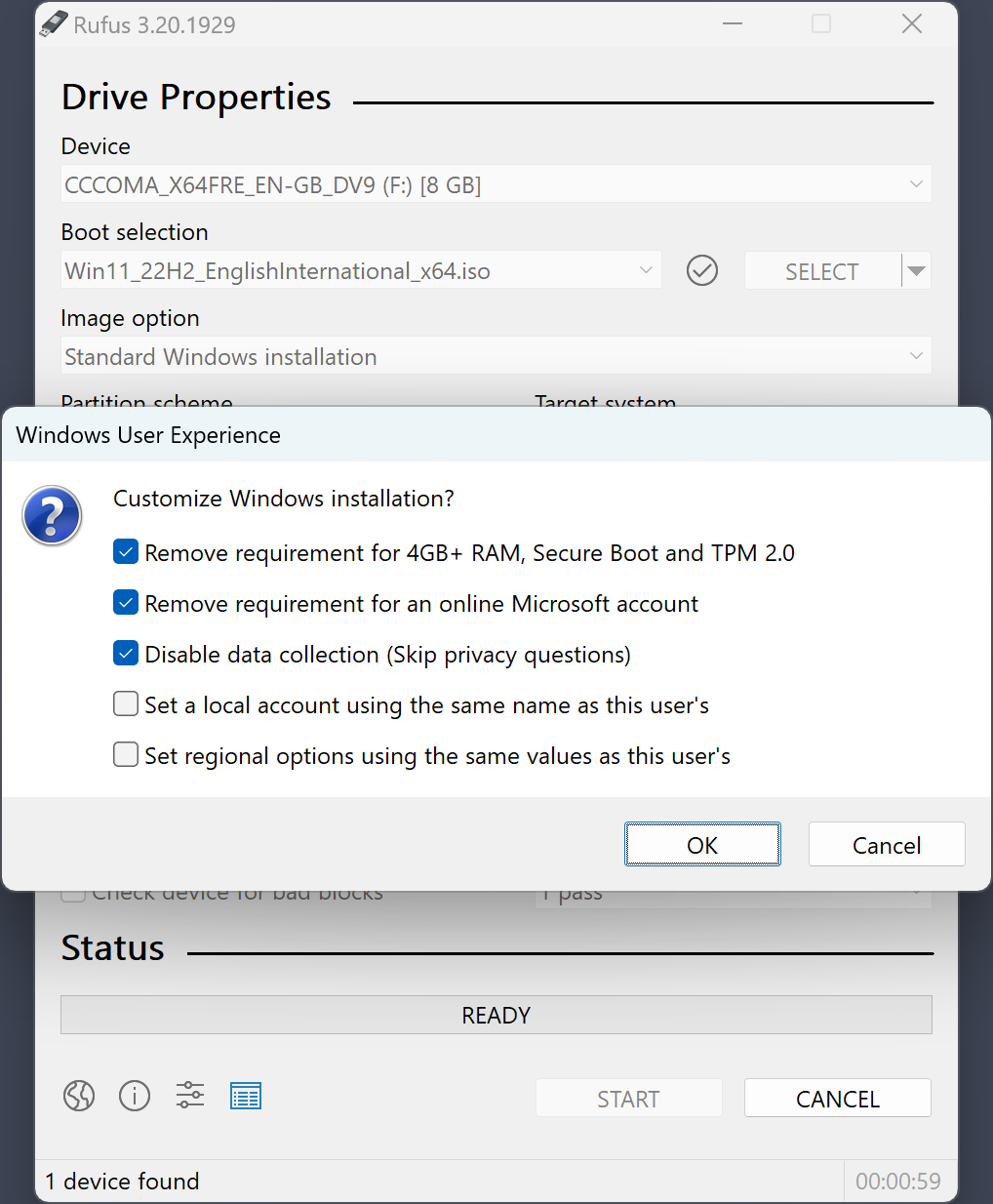
What further makes it easier, i have found, is to use Rufus to create a bootable Windows installation media from the latest ISO file you can get from MS. It can then apply the following tweaks:

screenshot4_en.png


With the first option, you can install Win11 on hardware which doesn't meet some of the requirements (*1). Note that the CPU should still include SSE4.2 instructions, otherwise it probably won't work with Win11 24H2 onwards. With the second option, it pre-applies the tweak so you can click "i don't have internet" right away and create a local acount. With the third option, it skips all the questions that usually come at the end and basically selects the bottom option for them (only send required data etc.).

(*1) Note that when doing this on officially unsupported hardware, any further feature upgrades might have to be manually installed as well. If not, the PC might get stuck on an outdated version in the long run.
 
Back
Top