FAN02 just randomly stops working - Katana 15 HX B14WGK-076XDE-BB71465X16GXXDXX

robin.samieske

New member
Joined
Nov 2, 2026
Messages
6
Hey everyone,

I own a Katana 15 HX B14WGK-076XDE-BB71465X16GXXDXX. Pretty much right after purchase I noticed via monitoring the MSI Center, that the FAN02, which supposedly mainly cools the CPU, just randomly stops working. I tried different setups inside of the MSI Center, but even when forcing constant fan operation through User Scenario settings, the FAN just shuts off at some point. If I restart the PC the fan is working and seems to do so, until the CPU temp falls below a certain threshhold, then shuts off and never enables again. Sometimes even restarts fail to enable FAN02 again. Has anyone had similiar experiences and could give me a hand on how to go about it? MSI Support just wants me to send the laptop in, but right now, I can't really afford giving the Laptop away for service for over three weeks, as it is in daily use for work stuff.
 
Normally, Fan 2 is the GPU fan. When the GPU temperature is below about 50°C, the GPU fan will not spin. Alternatively, when the GPU temperature drops from a high value to around 40°C, the GPU fan will also stop spinning. You can observe the GPU temperature to see whether it follows this logic. You can try running a GPU load-type application and check whether the GPU fan spins after the GPU temperature rises above about 50°C.
 
Normally, Fan 2 is the GPU fan. When the GPU temperature is below about 50°C, the GPU fan will not spin. Alternatively, when the GPU temperature drops from a high value to around 40°C, the GPU fan will also stop spinning. You can observe the GPU temperature to see whether it follows this logic. You can try running a GPU load-type application and check whether the GPU fan spins after the GPU temperature rises above about 50°C.
y
Hey everyone,

I own a Katana 15 HX B14WGK-076XDE-BB71465X16GXXDXX. Pretty much right after purchase I noticed via monitoring the MSI Center, that the FAN02, which supposedly mainly cools the CPU, just randomly stops working. I tried different setups inside of the MSI Center, but even when forcing constant fan operation through User Scenario settings, the FAN just shuts off at some point. If I restart the PC the fan is working and seems to do so, until the CPU temp falls below a certain threshhold, then shuts off and never enables again. Sometimes even restarts fail to enable FAN02 again. Has anyone had similiar experiences and could give me a hand on how to go about it? MSI Support just wants me to send the laptop in, but right now, I can't really afford giving the Laptop away for service for over three weeks, as it is in daily use for work stuff.

Hey everyone,

I own a Katana 15 HX B14WGK-076XDE-BB71465X16GXXDXX. Pretty much right after purchase I noticed via monitoring the MSI Center, that the FAN02, which supposedly mainly cools the CPU, just randomly stops working. I tried different setups inside of the MSI Center, but even when forcing constant fan operation through User Scenario settings, the FAN just shuts off at some point. If I restart the PC the fan is working and seems to do so, until the CPU temp falls below a certain threshhold, then shuts off and never enables again. Sometimes even restarts fail to enable FAN02 again. Has anyone had similiar experiences and could give me a hand on how to go about it? MSI Support just wants me to send the laptop in, but right now, I can't really afford giving the Laptop away for service for over three weeks, as it is in daily use for work stuff.
it is the function of the fan and though the fan 2 is for gpu i guess and it disable it when a certiain temp achived and then only on when like the temps goes aruond 65 to 70
 
Hey,
thanks for the replies. I've read aswell that FAN02 is supposed to be the GPU-Fan, however iff I load GPU-heavy applications with FAN02 not working, the CPU temp rises way more than the GPU temp. That led me to believe that in my case, for whatever reason, FAN02 is mainly cooling the CPU.
 

Attachments

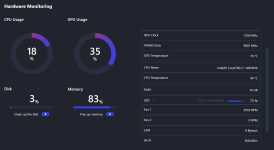
  • Hardware Monitoring.png
    Hardware Monitoring.png
    101.5 KB · Views: 50
Based on the image you provided, the CPU temperature is 94°C and the GPU temperature is 76°C, but FAN1 is only at 3555 RPM and FAN2 is at 0. This is definitely abnormal. We recommend that you try the following methods to troubleshoot the issue:

1,Reset EC: Shut down the computer, disconnect the AC adapter, press and hold the power button for 25 seconds, then reconnect the AC adapter.

2,Visit the MSI official website to download and update to the latest BIOS.

3,Refer to the steps in FAQ 4147 to perform a clean installation of MSI Center.
Thanks again.

1. → did that already, seemed to work fine at first, but fan failure occured again
2. → checked my bios version, its the latest one
3. → did that just now, failure still persists
 
Discovered a new feature: Incurred GPU-heavy load, FAN02 didnt work, set the laptop aside with a closed lit, probably falling into sleep mode, opened back up: suddenly the second fan starts working again. Tested that again after a restart, exact same behavior lol
 
Discovered a new feature: Incurred GPU-heavy load, FAN02 didnt work, set the laptop aside with a closed lit, probably falling into sleep mode, opened back up: suddenly the second fan starts working again. Tested that again after a restart, exact same behavior lol
That's so weird...
 
If the GPU temperature reaches 76°C, or what you described as an already very high temperature, and FAN2 still does not spin, recommended that you contact MSI customer service for further inspection, as it may be related to the fan hardware.
 
If the GPU temperature reaches 76°C, or what you described as an already very high temperature, and FAN2 still does not spin, recommended that you contact MSI customer service for further inspection, as it may be related to the fan hardware.
Yeah, I was afraid that's how it would turn out. I'll be on holidays near christmas and see, if I can send it in then. Thanks for the help and the frequent replies!
 
Back
Top