dhananjay260158902e7
New member
- Joined
- Dec 6, 2025
- Messages
- 5
Dear MSI Customer Support Team,
Subject: Final Complaint – Defective MSI Laptop, Repeated Technical Issues and Request for Complete Replacement
I am writing to express my serious disappointment with my MSI laptop, which has been giving me continuous problems since I purchased it.
Despite several complaints, service visits, and even a motherboard replacement by your authorized service team, the laptop is still not working properly. I have given MSI enough opportunities to fix these issues, but unfortunately, no permanent solution has been provided.
Problems I Am Facing:
1. Frequent System Crashes and Blue Screen Errors
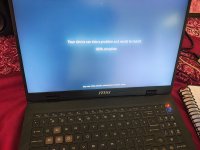
My laptop repeatedly shows the error message:
"Your device ran into a problem and needs to restart."
The system crashes without warning, restarts automatically, and sometimes does not turn on at all.
2. Motherboard Replaced, but the Problem Remains
After my earlier complaints, MSI replaced the motherboard. However, the same problems continued even after the replacement. This clearly shows that the repair did not solve the issue.
3. Windows Failure and Reinstallation
On 11 October 2026, my laptop completely failed to start. I had to recover the system and reinstall Windows 11.
Unfortunately, shortly after reinstalling Windows, the same blue screen error appeared again, and the laptop shut down.
4. Software Installation Issues
I am a professional graphic designer, and my work depends on software such as CorelDRAW, Adobe Photoshop, and Adobe Illustrator.
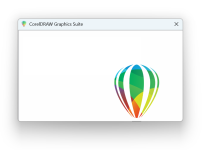
Recently, I have been unable to install CorelDRAW properly. The installation repeatedly gets stuck or fails, affecting my daily professional work.
5. Loss of Important Design Files
After Windows recovery and reset, several important design files disappeared from my E drive.
Surprisingly, some old files reappeared, while other important files are still missing.
Both my C and E drives are partitions of the same internal SSD. I am very concerned about the safety of my professional data.
6. Drive Lock and Storage Problems
I have also noticed a lock symbol on one of my drives. Considering the repeated system crashes and missing files, I request MSI to investigate the laptop's hardware and storage system thoroughly.
7. Impact on My Professional Work
As a graphic designer, my laptop is an essential tool for my work.
Because of these repeated problems, I have lost valuable working hours, faced delays in completing projects, and experienced serious inconvenience and stress. These issues have also created a risk of financial loss.
MY FINAL REQUEST – COMPLETE LAPTOP REPLACEMENT
I have already given MSI several chances to repair this laptop. Even after replacing the motherboard, the problems have not been resolved.
I am no longer willing to accept repeated repairs that fail to provide a permanent solution.
I request MSI to replace my defective laptop with a brand-new laptop of the same or better specifications, without any additional charges, in accordance with my applicable warranty and consumer rights.
FINAL NOTICE – CONSUMER COMPLAINT AND LEGAL ACTION
If I do not receive a satisfactory written response and a clear resolution plan within 7 calendar days of receiving this email, I will be left with no option but to raise a formal complaint with the National Consumer Helpline and the appropriate Consumer Disputes Redressal Commission under the Consumer Protection Act, 2019.
I will also consider seeking a replacement or refund and compensation for any documented losses and inconvenience, as permitted by law.
I have records of my previous complaints, motherboard replacement, system errors, and other technical problems, which I can provide as evidence if required.
My request is very clear: I do not want another temporary repair. I want a reliable, brand-new replacement laptop.
I request MSI management to take this complaint seriously and provide a permanent solution as soon as possible.
Please acknowledge this email and share your written decision within 7 calendar days.
Thank you.
Sincerely,
Dhananjay Kumar
Mobile: +91 7870108094
Laptop Details:
Model: MSI Crosshair 16 HX AI D2XWFKG-067IN
Configuration: Ultra 9 275HX / 16GB RAM / 1TB SSD / Windows 11 / 8GB Graphics / Grey
Warranty: 2 Years
Serial Number: K2505N0114383