manishpanihar15153c02d8
New member
- Joined
- Feb 18, 2026
- Messages
- 3
own an **MSI Thin 15 B12UC**. I am requesting technical assistance with incorrect system identification information and BIOS-related issues.
**1. BIOS Information**

- Laptop model: MSI Thin 15 B12UC
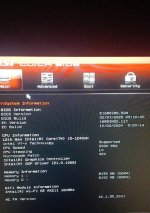
- BIOS version displayed in BIOS Setup: E16R8IMS.50A
- BIOS version reported by Windows: 02C4BF3B93F119C
**2. Incorrect System Identification**

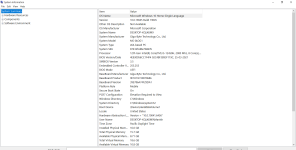
Windows reports the following information:
- System Manufacturer: Giga-Byte Technology Co., Ltd.
- System Model: MS-0LOG1
- BaseBoard Manufacturer: Giga-Byte Technology Co., Ltd.
- BaseBoard Product: 9E1813C1BB79686
I have checked this information using System Information, PowerShell/CIM commands, and the Windows Registry and With MSI center also in MSI center there feachers are not working . The incorrect identification was present in both Windows 10 and Windows 11.
**3. SMBIOS/DMI Write Errors**
I attempted to investigate the incorrect identification using DMIEDIT in Windows and `amideefix64.efi` in UEFI Shell. Both tools failed to initialize or write the SMBIOS/DMI data. The UEFI Shell displayed these errors:
`Error: Fail to initialize SMBIOS.`
`d7 - Error: DMI Data write failed.`
I have stopped attempting to modify the firmware data to avoid further problems.
**1. BIOS Information**
- Laptop model: MSI Thin 15 B12UC
- BIOS version displayed in BIOS Setup: E16R8IMS.50A
- BIOS version reported by Windows: 02C4BF3B93F119C
**2. Incorrect System Identification**
Windows reports the following information:
- System Manufacturer: Giga-Byte Technology Co., Ltd.
- System Model: MS-0LOG1
- BaseBoard Manufacturer: Giga-Byte Technology Co., Ltd.
- BaseBoard Product: 9E1813C1BB79686
I have checked this information using System Information, PowerShell/CIM commands, and the Windows Registry and With MSI center also in MSI center there feachers are not working . The incorrect identification was present in both Windows 10 and Windows 11.
**3. SMBIOS/DMI Write Errors**
I attempted to investigate the incorrect identification using DMIEDIT in Windows and `amideefix64.efi` in UEFI Shell. Both tools failed to initialize or write the SMBIOS/DMI data. The UEFI Shell displayed these errors:
`Error: Fail to initialize SMBIOS.`
`d7 - Error: DMI Data write failed.`
I have stopped attempting to modify the firmware data to avoid further problems.
Attachments
Last edited:
