regimanuel17
New member
- Joined
- Oct 7, 2026
- Messages
- 1
Hi everyone,
I recently built a new PC and I'm having an issue with my MSI MPG CORELIQUID P13 360 White LCD.
The cooler itself appears to be working correctly. The pump/fans are working, and the LCD is functioning and displaying/cycling hardware information normally.
The problem seems to be specifically with MSI Center / EZ Display.
MSI Center → Live Update → Advanced → Scan
it showed:
I'm attaching the same screenshots I provided with the support ticket showing the firmware-update message and the "No updates available / Already up to date" message.
I really want to be able to customize the displays and performance measurements that are juggling in the LCD but from what i understand - you can only control this using the EZ display in MSI center.
Any advice from anyone who has experience with the MPG CORELIQUID P13 Series would be greatly appreciated.
I recently built a new PC and I'm having an issue with my MSI MPG CORELIQUID P13 360 White LCD.
The cooler itself appears to be working correctly. The pump/fans are working, and the LCD is functioning and displaying/cycling hardware information normally.
The problem seems to be specifically with MSI Center / EZ Display.
System
- CPU: AMD Ryzen 7 9800X3D
- Motherboard: ASUS B650E MAX GAMING WIFI
- GPU: Gigabyte Radeon RX 9070 XT Gaming OC 16GB
- RAM: Corsair Vengeance RGB 32GB DDR5-6000
- OS: Windows 11 Pro
- Cooler: MSI MPG CORELIQUID P13 360 White LCD
The original issue
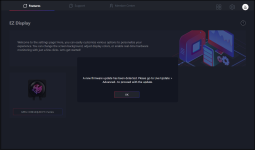
When I opened MSI Center and selected the MPG CORELIQUID P13 Series, MSI Center showed:However, when I went to:"A new firmware update has been detected. Please go to Live Update > Advanced.. to proceed with the update."
MSI Center → Live Update → Advanced → Scan
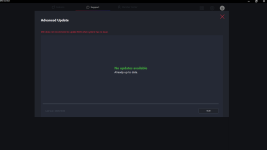
it showed:
So MSI Center says the P13 requires a firmware update, but Live Update says there is no update available."No updates available / Already up to date."
What I have tried
I followed MSI's recommended clean installation process.- Used MSI Clean Center Master to completely remove MSI Center.
- Restarted the PC.
- Downloaded the latest MSI Center from the official P13 support page.
- Reinstalled MSI Center.
- MSI Center opened normally afterward.
I'm attaching the same screenshots I provided with the support ticket showing the firmware-update message and the "No updates available / Already up to date" message.
I really want to be able to customize the displays and performance measurements that are juggling in the LCD but from what i understand - you can only control this using the EZ display in MSI center.
Any advice from anyone who has experience with the MPG CORELIQUID P13 Series would be greatly appreciated.