Tech-Support MSI B550M PRO-VDH-WiFi not showing boot screen/display after changed from UEFI to CSM.

Troubleshooting

bijokk.jomon

New member
Joined
Oct 10, 2026
Messages
7
MSI B550M PRO-VDH-WiFi not showing boot screen/display after changed from UEFI to CSM. I have RX550 graphics card & Ryzen7 5700x processor. Initially it was showing BIOS, since M.2 disks were not showing up in BIOS I changed booting from UEFI to CSM. post restart no display.
I tried resetting BIOS by removing battery, jumpin mode, flashed lastest BIOS firmware from pendrive, still no display.
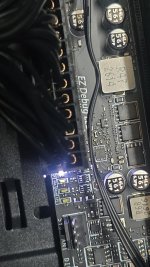
Motherboard warning light shoes BOOT light.

Please advise here.
 
Just to make sure I understand you correctly. Your system set to UEFI and M.2 system drive formatted with GPT was working. Then M.2 disks were no longer showing in BIOS. Did you notice this because the system would not boot after which you went into the BIOS?

If the RX550 worked with the motherboard in UEFI mode then I expect it to work in CSM mode as well. With the RX500 series it is often the case they only support CSM mode. They then need to be patched to provide GOP support to work with UEFI. Looking at the GPU is very likely a red herring.

The EZ Debug LED hangs at BOOT. This means it has problems seeing the M.2 disks as you also saw in the BIOS. What happens when you remove the M.2 disks? Does your system POST and are you able to enter the BIOS/
Thank you very much for your response. I will explain from the begining.

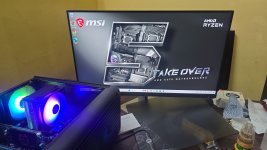
Yesterday only I assembled the PC with Ryzen7 5700X, MSI B550 Pro VDH WiFi, Samsung 2 X 8GB 3200 DDR4 (used one), M.2 NVME 512GB (used one), Dell RX550 OEM Graphics Card (used one), Deepcool PL550D 550WPSU, Deepcool AG400 cooler, Circle Amazer X1 Mid- Tower Computer Case.
I built it for my wife as she learning basics of Blender. Due to budget constrain I decided to start with RX550 GPU and later will upgrade to a better one for Blender. My cousin got the used part from his friends.
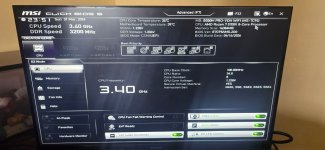
Post assebly I connected the DP cable to the RX550 out and connected to my existing Samsung 24 monitor. Post few seconds BIOS loaded and CPU & RAM were showing; however M.2 SSD was not showing. So I thought that it was due to UEFI boot and I changed it to CSM in BIOS and restarted. Post restart nothing was displaying. I tried doing BIOS reset by removing CMOS battery, jumping JBAT1 pins. Then I did BIOS update by connecting pendrive, but no display still. In the motherboard BIOS light is ON.
I read in some posts that since Dell RX550 was an Dell OEM Graphics Card it might be locked only to UEFI mode. I can still see that the graphic card fan is running and PC also running but no output. Even I removed the M.2 SSDs but no postive result.
So, please suggest me, do I need to try with a different graphics card? or any other method to sort this like inserting a bootable win11 installed M.2?. I am totally worried :-(
I am attaching th initial BIOS screen pic and fault light pic for your reference.
 

Attachments

  • WhatsApp Image 2026-10-10.jpg
    WhatsApp Image 2026-10-10.jpg
    73.8 KB · Views: 47
  • WhatsApp Image 2026-10-10 at 22.28.37.jpeg
    WhatsApp Image 2026-10-10 at 22.28.37.jpeg
    178.7 KB · Views: 54
Last edited:
Definitely try a different card, it's a really old and not built for regular PC builder.
Yeah, I understand. Due to budget constrain I went with this Dell OEM RX550 card for the timebeing, eventually planning to upgrade.
But here, during 1st boot after assembling display came and I entered in BIOS. Post changing from UEFI to CMS even BIOS also not displaying.
 
Try hooking up the GPU by HDMI to the monitor and see if that makes a difference. This may help to get you into the BIOS.

Samsung 2 X 8GB 3200 DDR4 (used one),
Did you buy them second hand or do they come from a previous computer? Worded differently: do you know they were working before you got them?

M.2 NVME 512GB (used one),
Did you buy it second hand or did it come from a previous computer? If I understand correctly it was formatted before you got it and came with Windows installed?

In the motherboard BIOS light is ON.
What light are you referring to? Are you referring to the BOOT LED lighting up in the second photo? That one list up when it cannot boot. This was probably after you removed the M.2s for testing. Is that correct?
 
Try hooking up the GPU by HDMI to the monitor and see if that makes a difference. This may help to get you into the BIOS.


Did you buy them second hand or do they come from a previous computer? Worded differently: do you know they were working before you got them?


Did you buy it second hand or did it come from a previous computer? If I understand correctly it was formatted before you got it and came with Windows installed?


What light are you referring to? Are you referring to the BOOT LED lighting up in the second photo? That one list up when it cannot boot. This was probably after you removed the M.2s for testing. Is that correct?
RAM, M.2 SSD & Graphics cards are second hand; however RAM is working as per the initially BIOS screen and Graphics card also worked thats why only I was able to see the BIOS settings during initial login. I haven't tested the M.2 SSD yet, let me try to install Win11 by plugin in another PC and keep in this system and re-try.

Regarding BOOT light, post switch on after few seconds VGA light was on, then it turned off and BOOT light was ON. This is same even after removing M.2.
And my Dell OEM RX550 card has only DP & Mini DP ports, hence I am using DP to HDMI converter connector.

(Currently, I am out of town. I will return on Saturday)
 
Last edited:
As far I understand the problem. Hanging at the BOOT LED is probably caused by switching to CSM/UEFI mode from UEFI mode. For now I would focus on getting into the BIOS by borrowing a GPU from a friend or family member. This may be the key to getting in the BIOS and setting to UEFI mode instead of CSM/UEFI.
 
As far I understand the problem. Hanging at the BOOT LED is probably caused by switching to CSM/UEFI mode from UEFI mode. For now I would focus on getting into the BIOS by borrowing a GPU from a friend or family member. This may be the key to getting in the BIOS and setting to UEFI mode instead of CSM/UEFI.
Thank you Eric, I will try the same and update you the results latest by this Sunday.
 
Back
Top