Hi,
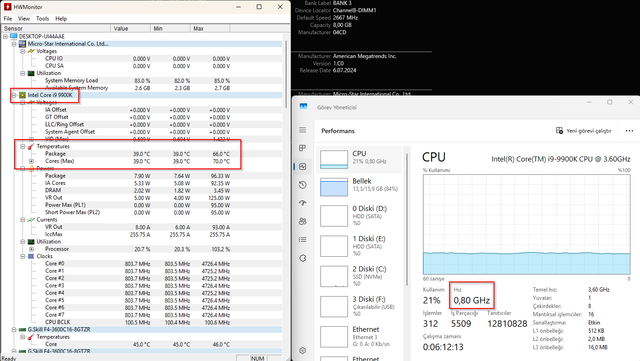
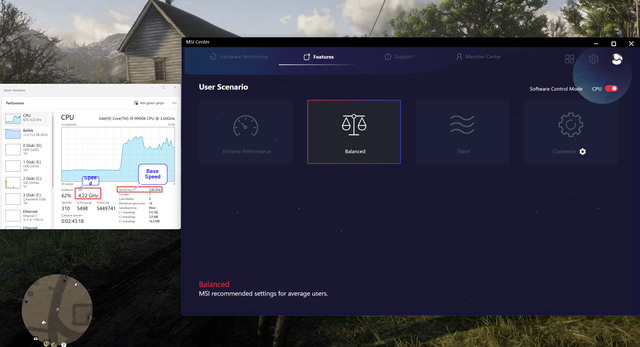
I use MSI center for about 1 year in extreme performance and I haven't experienced any problem. Overclock for cpu looks good until now. But recently my cpu speed stucked at 0.80MHz while extreme performance is selected in MSI Center software. I am experiencing incredible slowness on the pc while playing a game or not in extreme performance. But when I change the profile in MSI Center from Extreme Performance to Balanced or Silence , my pc is Ok. Everything is fine. I can play games or surfing on the internet smoothly.
At Extreme Performance Mode

At Balanced Mode
My PC specs are as follows:
Noticeable thing in terms of me, recently I updated msi center software. Maybe because of this buggy update, my cpu stucked 0.80Mhz in extreme performance while playing. Shouldn't I try extreme performance right now? Is that dangerous for my situtation for now?
What is the reason of this problem according to you? What should I do?
Note: I uninstall MSI Center, then reinstall it from official msi website, but there is no change. Balanced and Silent profile is OK, but Extreme Performance is problematic.
I use MSI center for about 1 year in extreme performance and I haven't experienced any problem. Overclock for cpu looks good until now. But recently my cpu speed stucked at 0.80MHz while extreme performance is selected in MSI Center software. I am experiencing incredible slowness on the pc while playing a game or not in extreme performance. But when I change the profile in MSI Center from Extreme Performance to Balanced or Silence , my pc is Ok. Everything is fine. I can play games or surfing on the internet smoothly.
At Extreme Performance Mode
At Balanced Mode
My PC specs are as follows:
CPU: Intel i9 9900K
CPU Cooler: NZXT x62 Kraken
Motherboard: MSI MEG Z390 ACE
RAM: 2 x GSkill F4-3600C16 8GB
SSD: Samsung SSD 970 EVO Plus 1TB
Graphic Card: EVGA GTX 1080 Ti FTW3
PSU: Corsair HX1000i
Chassis: Corsair 500D RGB SE Mid-Tower
OS: Windows 11
Monitor: AOC Agon AG271QG
PSU Age: 8 years
BIOS Info: American Megatrends Inc. 1.C0, 6.07.2024
Noticeable thing in terms of me, recently I updated msi center software. Maybe because of this buggy update, my cpu stucked 0.80Mhz in extreme performance while playing. Shouldn't I try extreme performance right now? Is that dangerous for my situtation for now?
What is the reason of this problem according to you? What should I do?
Note: I uninstall MSI Center, then reinstall it from official msi website, but there is no change. Balanced and Silent profile is OK, but Extreme Performance is problematic.