spycrab13315df02e9
New member
- Joined
- Sep 25, 2025
- Messages
- 9
Hi there
I've just got myself a MSI Claw A1M, specifically to play COD Zombies\Warzone, Fortnite and other online games after work
I am experiencing a “Failed Attestation Status” issue in Call of Duty, even tho Call of Duty Secure Attestation Wizard reports that requirements are met.
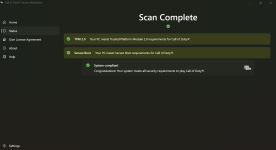
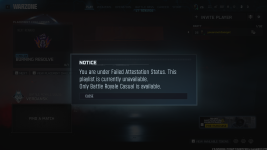
I'm using Windows 11 Home 26H2, all my drivers, bios and all programs are updated, drive is encrypted, secureboot is enabled. Like, literally, sytem is set up.
However, with help of chatgpt, I've found out that Windows reports event "TPM-WMI 1041: PcrsMatchTcgLog = false, BitMaskOfPcrMismatches = 1"
Also, executing "tpmtool comparepcr" command confirms that there's some kind of mismatch.
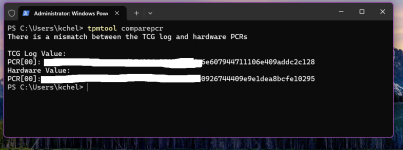
I've stumbled upon this post, , it was saying that updating "MSI Firmware driver" fixed the Issue, but for some reason author has removed his post. Here's screenshot tho:

I, unfortunately, haven't found any other drivers that can be updated on my system, so, probably this is something that MSI should fix.
I've just got myself a MSI Claw A1M, specifically to play COD Zombies\Warzone, Fortnite and other online games after work
I am experiencing a “Failed Attestation Status” issue in Call of Duty, even tho Call of Duty Secure Attestation Wizard reports that requirements are met.
I'm using Windows 11 Home 26H2, all my drivers, bios and all programs are updated, drive is encrypted, secureboot is enabled. Like, literally, sytem is set up.
However, with help of chatgpt, I've found out that Windows reports event "TPM-WMI 1041: PcrsMatchTcgLog = false, BitMaskOfPcrMismatches = 1"
Also, executing "tpmtool comparepcr" command confirms that there's some kind of mismatch.
I've stumbled upon this post, , it was saying that updating "MSI Firmware driver" fixed the Issue, but for some reason author has removed his post. Here's screenshot tho:
I, unfortunately, haven't found any other drivers that can be updated on my system, so, probably this is something that MSI should fix.
 ))


