Tech-Support MSI FORGE GK600 TKL Wireless – TFT display with corrupted internal menus

Troubleshooting

ernestin1432

New member
Joined
Oct 27, 2026
Messages
3
Hello, I have an MSI FORGE GK600 TKL Wireless keyboard (model MS-8ZA9), identified via USB as VID_0DB0 / PID_EA47. I am experiencing an issue with the keyboard's TFT display after uploading a large, custom GIF animation using the MSI software.

The problem is as follows:
The display functions normally and shows the MSI logo upon startup. I can upload and change custom GIFs without any issues.
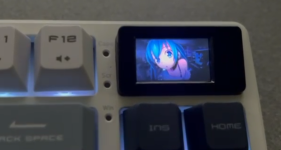
However, when accessing the keyboard's internal menus (brightness, battery, settings, etc.), instead of displaying the original graphics, the screen shows images or frames from a previously uploaded GIF animation.

The functions within these menus still work correctly; the issue is purely visual. The problem persists even when the MSI software is closed and the keyboard is being used in wireless mode.

I have already tried resetting the keyboard using the Fn + Esc key combination and using the "Factory Reset" option within the MSI software, but neither method resolved the issue.

Is there an official tool available to restore the graphical assets for the TFT display or to reset the internal memory where the menu images are stored?

Additionally, could you please provide a recovery or firmware update procedure specifically for the MS-8ZA9 model?
 
MSI does not offer any "official software" for GK600 to edit the display. Although it's been on MSI Gk600 duke version for very long time, it requires you to manually edit the xml file to get it work on other GK600 which tells me you shouldn't use it on a regular GK600.
Somehow, they make it available on Frieren edition:confused2:
Can you try completely drain the battery of the keyboard? Just use it in wireless until it powers off on its own.
 
Last edited:
MSI does not offer any "official software" for GK600 to edit the display. Although it's been on MSI Gk600 duke version for very long time, it requires you to manually edit the xml file to get it work on other GK600 which tells me you shouldn't use it on a regular GK600.
Somehow, they make it available on Frieren edition somehow :confused2:
Can you try completely drain the battery of the keyboard? Just use it in wireless until it powers off on its own.
Thanks for the suggestion! I'll try letting the keyboard discharge normally and see if that helps.

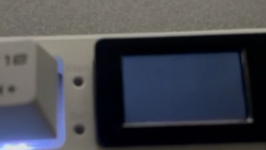
The interesting part is that the mini screen and custom GIFs still work perfectly, but all the built-in menus are completely black, even after a factory reset.

I suspect the original menu graphics may have been overwritten in the keyboard's flash memory after uploading GIFs beyond the original 255-frame limit.
 
Hi ernestin,

I've got the same keyboard (MS-8ZA9, 0DB0:EA47) and I've been digging into how the screen stores its images. I think I understand what happened, and there might be a way to get the menus back using just the MSI software, but I need a few details first to be sure:

1. How many frames did the big GIF have? The exact number if possible (ezgif.com or any GIF tool will show it). Resolution and file size too.
2. Which menus are messed up exactly? Brightness bar, battery, profile numbers, Bluetooth/connection icons, the Effect / Colour / Settings screens... And which ones still look normal?
3. In the broken menus, do you see frames from the end of your GIF, or random frames from anywhere in it?
4. Which driver version did you use (1.0.0.8?) and did you upload over the USB cable or the 2.4G dongle?
5. If you can, a couple of photos of the broken menus would help a lot.

In the meantime I'd avoid uploading any GIF with more than 125 frames, it could make things worse.

Thanks!
 
Last edited:
Hi ernestin,

I've got the same keyboard (MS-8ZA9, 0DB0:EA47) and I've been digging into how the screen stores its images. I think I understand what happened, and there might be a way to get the menus back using just the MSI software, but I need a few details first to be sure:

1. How many frames did the big GIF have? The exact number if possible (ezgif.com or any GIF tool will show it). Resolution and file size too.
2. Which menus are messed up exactly? Brightness bar, battery, profile numbers, Bluetooth/connection icons, the Effect / Colour / Settings screens... And which ones still look normal?
3. In the broken menus, do you see frames from the end of your GIF, or random frames from anywhere in it?
4. Which driver version did you use (1.0.0.8?) and did you upload over the USB cable or the 2.4G dongle?
5. If you can, a couple of photos of the broken menus would help a lot.

In the meantime I'd avoid uploading any GIF with more than 125 frames, it could make things worse.

Thanks!
Hi gregoir59100,

Thank you very much for your response and for investigating this issue! It's great to hear from someone who has the same keyboard and is looking into how its internal display memory works.

Here are the details from my tests:

1. GIF frames, resolution, and file size

One of the original GIF files I analyzed had the following specifications:

  • Frames: 125
  • Resolution: 160 × 96 pixels
  • File size: 168,610 bytes
  • Duration: approximately 5 seconds (25 FPS)
However, I also experimented with GIFs containing more frames. During testing, I modified the gif_maxframes parameter to 10005 to bypass the software's original limitation.

I also observed what appeared to be a limitation around 255 frames, where longer animations would restart prematurely.

I cannot confirm exactly which GIF upload first caused the corruption.

2. Which menus are broken?

All the keyboard's internal TFT menus appear to be affected.

The screen is essentially black when navigating the internal menus. Icons, text, and other graphical elements are no longer displayed correctly.

However, the keyboard's physical controls and navigation still work.

Interestingly, the uploaded animated GIF continues to display and play normally.

3. Do corrupted menus show parts of the GIF?

No. I don't see random GIF frames or fragments of the animation inside the broken menus.

The menus simply appear black, without their usual graphical elements.

4. Driver version and connection method

I used the MSI software beta version 1.0.0.8.

I performed tests using the USB cable and also checked the keyboard in 2.4 GHz wireless mode.

The problem persists regardless of the connection mode, even when the MSI software is closed.

5. Photos of the corrupted menus

I can provide screenshots/photos showing how the internal menus look.

Additional information

I have already attempted a factory reset, but it did not resolve the issue.

Another interesting observation is that the previously uploaded GIF remains stored inside the keyboard, even after clearing the software's GIF library.

The GIF continues playing directly from the keyboard's internal memory, including when operating wirelessly.

This makes me suspect that the GIF storage and the internal menu graphics may be using overlapping or related memory regions, although I cannot confirm that.

I would be very interested in trying a recovery procedure using the MSI software if you have identified a possible way to restore the internal graphical assets.

Thank you again for your help and research!
 

Attachments

  • Captura de pantalla 2026-11-08 114915.png
    Captura de pantalla 2026-11-08 114915.png
    484.9 KB · Views: 46
  • Captura de pantalla 2026-11-08 114922.png
    Captura de pantalla 2026-11-08 114922.png
    248.4 KB · Views: 25
Back
Top