Tech-Support MSI MEG X570 ACE + Ryzen 9 3900X – Compatibility with AMD Radeon AI PRO R9700 32GB

Troubleshooting

HamiltonRL

New member
Joined
May 1, 2020
Messages
1
Hello everyone!

I currently have an MSI MEG X570 ACE motherboard paired with an AMD Ryzen 9 3900X, and I'm considering upgrading my GPU to an Radeon AI PRO R9700 Creator 32GB.

My main goal is to use this system as a personal workstation for AI development, machine learning, and local AI model inference.

Before purchasing the GPU, I'd like to confirm a few technical details:

  1. GPU compatibility: Is the Radeon AI PRO R9700 fully compatible with the MSI MEG X570 ACE and Ryzen 9 3900X?
  2. PCIe compatibility: Since the R9700 uses PCIe 5.0 x16 and my motherboard supports PCIe 4.0, should the card work normally at PCIe 4.0 x16, without any compatibility issues?
  3. BIOS requirements: Is there a specific BIOS version required or recommended for this GPU? Are there any relevant settings, such as Above 4G Decoding, Resizable BAR, or UEFI/CSM, that I should configure?
  4. Future multi-GPU setup: I'm also considering installing a second R9700 in the future for AI workloads using AMD ROCm. Would the motherboard support both GPUs operating at PCIe 4.0 x8/x8 with my Ryzen 9 3900X?
  5. Known limitations: Are there any known compatibility issues, hardware limitations, or stability concerns with this combination?
I understand that the R9700 is a newer PCIe 5.0 GPU and that PCIe is backward compatible. However, since this is a relatively expensive workstation GPU, I'd prefer to confirm actual compatibility before making the purchase.

If anyone from MSI or someone with experience using newer professional AMD GPUs on the X570 platform could provide some guidance, I would really appreciate it.

Thanks in advance!
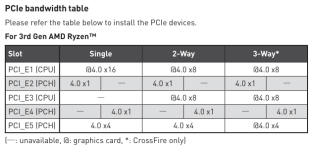
 
The compatible graphics card for MEG X570 ACE could be found from the list: https://www.msi.com/Motherboard/MEG-X570-ACE/support#vga
The card not listed is not validated for compatibility with the mainboard.

For 3rd Gen AMD Ryzen CPU, multi-GPU on PCIe slot 1, 3 supports PCIe 4.0 x8 speed. (Referring to page 33, 34 in the manual describing PCIe bandwidth difference depending on different CPU generations).
 

Attachments

  • MEG X570 ACE PCIe.png
    MEG X570 ACE PCIe.png
    37.9 KB · Views: 36
Last edited:
The card not listed is not validated for compatibility with the mainboard.

I wouldn't give too much importance on that. Most cards that are not listed are because they didn't have them in the lab, not because they aren't compatible. For example with AM4 500-series boards, they won't keep testing new graphics cards forever, they are busy with AM5 and Intel. So most newer cards probably won't be listed.

PCIe standards are fully backwards compatible. If it works on an older standard or half the lanes, it will lose bandwidth to the CPU, so it will lose a bit of performance. But for some calculations which only happen on the GPU, this might not matter much.

As for the BIOS, update to the latest version. Use UEFI mode nowadays, with Above 4G Decoding and Resizable BAR enabled. That's basically free performance.
 
Workstation GPU, I'd prefer to confirm actual compatibility before making the purchase.
Workstation GPU compatibility cannot be guaranteed
Nvidia Workstation Blackwell has been known not to work on Retail boards.
AMD workstation GPUs may have the same problem.
We also can't test the GPU on retail boards.
 
What do you mean? Is it not allowed or is is an MSI policy? I am just curious.
Workstation Cards are rarely tested on Retail Consumer Boards as 99.9% of users of them will use Retail Consumer GPU's so its a Waste to test them as only 1:1000 is even likely to think about it so they focus on QVL Checking Retail Graphics Cards. Work Station Boards Rarely get Retail Consumer Cards Tested on them as there the Opposite as they will mostly be using Workstation GPU's.

its more what is worth it to test as testing Costs Money to do and will that be helpful to the Masses.
 
What do you mean? Is it not allowed or is is an MSI policy? I am just curious.
I have requested testing befor but unfortunately the Retail test lab does not have access to server-level hardware.
Mainly for the reason Badboy mentions, is practicality, and the sheer cost of the cards puts them beyond most retail customers.

Mind you, retail cards do seem to be catching up to server cards in pricing


ts more what is worth it to test as testing Costs Money to do and will that be helpful to the Masses.
Ya and I'm pretty sure some of the testing we request is not cheap.
 
Ya and I'm pretty sure some of the testing we request is not cheap.

yes it will as they have to Pay someone to sit there testing a Card over and over again on a Board to Make sure it functions correctly so for one person it will eat up there entire Week of work so will not be Cheap to do just for a Single Board.
 
Back
Top