MSI ThunderboltM4 8K PCIE kills Z790 BIOS graphics

i_m_t152102cd

New member
Joined
Jan 19, 2023
Messages
6
Hi all,
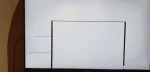
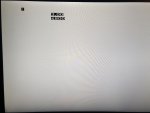
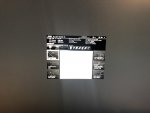
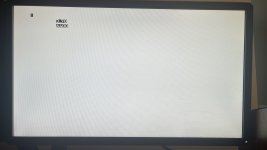
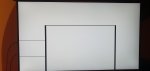
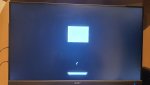
I have a MAG Z790 Tomahawk WIFI DDR4 on the latest BIOS and have installed a ThunderboltM4 8K PCIE card. After a few problems I finally have thunderbolt working for my UAD Apollo x4, but when I enable thunderbolt in the BIOS and restart the startup splash screen graphics are all blank. Same if I try to enter the BIOS, everything is blank and I can't see any text to choose options.
If I reset the BIOS all of the graphics come back, has anyone had similar and fixed this?
 

Attachments

  • 20230119_224335.jpg
    20230119_224335.jpg
    1.7 MB · Views: 307
  • 20230119_222824.jpg
    20230119_222824.jpg
    867.1 KB · Views: 335
Solution
FYI:
It is NVIDIA GTX 900 series and AMD RX 500/AMD RX 400 series graphics card’s limitation that when “Discrete Thunderbolt(TM) Support” option being set as [Enabled] and BIOS under UEFI Mode, BIOS menu would be displayed as white screen. With BIOS CSM Mode, the symptom would not occur. The symptom could be seem with other brand’s GTX 900 series and AMD RX 500/AMD RX 400 series graphics cards.
Please use NVIDIA GTX 1000 series / AMD RX 5000 series graphics card or newer for display compatibility when using ThunderboltM4 8K card on Intel 700, 600 series mainboards.
I have same motherboard and Thunderbolt card, 13700K and internal DP graphics if that matters (not routed through the Thunderbolt). No UAD Apollo, but storage with speed >2G. I see normal startup graphics and BIOS text.
Unclear what you mean when you say reset the BIOS (does that mean change the Discrete Thunderbolt support back to Disabled)?

Just wanted to mention that FWIW (not saying you shouldn't open a ticket with MSI).

My only trouble with MSI Thunderbolt card (on earlier generation motherboard) after taking care to use the proper slot (needs to be at least x4 and from chipset not CPU) was mistakenly having the cable not properly installed onto all the motherboard header pins.
 
Thanks heaps for the help so far. I checked the cables are installed properly. I discovered I didn't actually have the latest BIOS installed so I tried updating that and I still have the same problem.

Unclear what you mean when you say reset the BIOS (does that mean change the Discrete Thunderbolt support back to Disabled)?

Yes that is what I meant, when I change Thunderbolt support back to disabled the BIOS is normal, thanks for helping me clarify.

I have the ThunderboltM4 in the PCI_3 PCIe4.0 x4 slot, in the manual it says this slot is "from z790 chipset".

I tried reseating the ThunderboltM4 and the cables again with no luck.

I forgot to mention I also have a Samsung 980 Pro NVME M.2 in the M2_1 slot and an old Sapphire Nitro RX480 graphics card in the PCI_1 slot and using a Displayport connection to my monitor if any of those details might help?
 
Such details could help someone, but not me. I don't use graphics cards but apparently there are multiple versions of RX480 such as one switchable between UEFI and Legacy, and ones for each of those modes that are not switchable (maybe even also different VBIOS that users try to flash). My M2_1 slot is SN850X, and my Thunderbolt card is in the slot you describe (with the cables connected to JTBT and JUSB).
 
Hi, I have an Edge Z690 WiFi DDR4 with the MSI M4 8K card installed in the lower middle PCIe (PCI_E3) x4 slot (from the Z690 chipset). The board is paired with an Asus Strix 3080 12GB OC card in the primary/top PCIe slot; the monitor is directly connected to my GPU via the GPU's DP connection -- bypassing the TB4 card.

With PCIE Tunneling over USB4 Enabled and Discrete TB Support Enabled, along with all of the TB Support settings left at stock (after enabling Discrete TB Support Enabled), I do not experience any issues. While the TB4 card is installed/enabled, nothing is connected to it.

I do have "PEG" as the "Initiate Graphic Adapter" setting -- if it matters.

Not sure if any of this helps you, but I figure I'd at least my settings.
 
I don't use graphics cards but apparently there are multiple versions of RX480 such as one switchable between UEFI and Legacy, and ones for each of those modes that are not switchable (maybe even also different VBIOS that users try to flash).

I tried the vbios switch on the RX480, no difference unfortunately.

I tried another graphics card, an ASUS RX570 but it does the same thing. Put the RX480 back in and tried all ports, same problem.

Next I tried taking out the graphics cards altogether and use the onboard DP.. IT WORKS!?! Boots into BIOS with all graphics and loads into windows with Thunderbolt working. What is going on??

Not sure if any of this helps you, but I figure I'd at least my settings.

Nah thanks heaps for posting mate, at least I know it should be working

I attached a short gif of what happens if I move the mouse around on the blank BIOS when using a graphics card.
 

Attachments

  • 20230122_141629.gif
    20230122_141629.gif
    1.8 MB · Views: 252
Again, I don't want to keep you from opening ticket with MSI. Are you saying that graphics card DP fails only in "BIOS" displays - it works in an OS such as Windows after graphics driver is loaded? Do you have a different DP monitor to try in case it is some DisplayID/EDID related problem? Have you tried all the DP ports and are you able to try the HDMI port from the card? Are there settings to try in BIOS such as PCIE_E1 - Max Link Speed to force a generation (lower?) of PCIe support for the graphic card?

Just trying to gather potential troubleshooting info for someone like MSI (it doesn't mean anything particular to me). FYI, I've updated my Z790 BIOS from 1.3 to 1.4 and Thunderbolt still works for me.
 
Last edited:
Are you saying that graphics card DP fails only in "BIOS" displays - it works in an OS such as Windows after graphics driver is loaded? Do you have a different DP monitor to try in case it is some DisplayID/EDID related problem? Have you tried all the DP ports and are you able to try the HDMI port from the card? Are there settings to try in BIOS such as PCIE_E1 - Max Link Speed to force a generation (lower?) of PCIe support for the graphic card?
Yes graphics only fail in BIOS displays when graphics card is installed and thunderbolt is enabled, works fine in Windows after graphics driver is loaded and thunderbolt works in Windows too. The BIOS graphics only fail when using a graphics card with thunderbolt enabled, when thunderbolt is disabled BIOS graphics are normal. If I use the motherboard HDMI or DP connection (i.e. no graphics card) and thunderbolt enabled, BIOS graphics are normal.

I tried two different monitors and two different graphics cards and all of the ports.

I tried the PCIE_E1 - Max Link Speed to Gen 3 to match my graphics card but no difference.

Cheers for all the suggestions, I have opened a support ticket...
 
Ok I have discovered if I change BIOS to Legacy + UEFI my graphics card shows BIOS graphics with Thunderbolt enabled. It is strange that it works fine on UEFI with Thunderbolt disabled though right?
 
I'm having this same issue... in my case, I installed the ThunderboltM4 8K card in a PRO Z690-A WIFI with a GTX 980, i9-13900K, and 96 GB RAM (DDR5). With Thunderbolt enabled, the screen flashes fully white at what would be the POST screen, and when I go into the BIOS, I get a white screen with just the :, 3.00, and 4800 from the clock, CPU speed and DDR speed. And if I move the mouse around, I can "erase" those.

Similar to noted above, if I change the BIOS mode to CSM instead of UEFI, I'm able to see the BIOS... though for some reason the resolution drops down to 640x480. I would be able to live with that, except I'm running Windows 11, which refuses to boot with CSM enabled.

Like the OP, I suspect this is a problem with my (now fairly old, but still decent) video card. I was hopeful this video card firmware update would fix it: https://www.nvidia.com/en-us/drivers/nv-uefi-update-x64/ , but unfortunately it made no difference. I tried video through both HDMI and DisplayPort.

For the time being, since it seems like everything is working in the BIOS, but video just isn't getting rendered correctly... I'm able to use the keyboard to make changes. At first I was pressing F6 -> Enter (load defaults), then F10 -> Enter (save and exit). But it was annoying having to reconfigure everything (particularly custom fan settings), so now I have my settings with Thunderbolt disabled saved as "Overclocking Profile 1" and settings with Thunderbolt enabled as "Overclocking Profile 2". That way I don't have to manually reset any settings... when I need to get into the BIOS I press F8 -> Enter (load OC Profile 1), then F10 -> Enter (save and exit). Once it reboots, I can get into the BIOS... then re-load OC Profile 2 to enable Thunderbolt when I exit (or re-save my profiles if I made a change I want to keep).

Anyway, just figured I'd post my workaround in case it helps someone... and I'd certainly be interested to hear if anyone knows of a proper fix.

Pat
 

Attachments

  • IMG_4296.JPG
    IMG_4296.JPG
    188.6 KB · Views: 258
  • IMG_4297.JPG
    IMG_4297.JPG
    249.9 KB · Views: 214
I'm able to use the keyboard to make changes. At first I was pressing F6 -> Enter (load defaults), then F10 -> Enter (save and exit). But it was annoying having to reconfigure everything (particularly custom fan settings), so now I have my settings with Thunderbolt disabled saved as "Overclocking Profile 1" and settings with Thunderbolt enabled as "Overclocking Profile 2". That way I don't have to manually reset any settings... when I need to get into the BIOS I press F8 -> Enter (load OC Profile 1), then F10 -> Enter (save and exit). Once it reboots, I can get into the BIOS... then re-load OC Profile 2 to enable Thunderbolt when I exit (or re-save my profiles if I made a change I want to keep).
Pat

That's exactly what I was doing, switching saved BIOS profiles blindly :) thanks for posting it for everyone Pat, I didn't think about doing that.

Support couldn't help fix the problem but I think I have found some settings that work...

I was having dramas with something causing my GPT SSD with Windows 11 to lose it's partitions and change to MBR. This happened multiple times and it was very confusing and annoying as I had to restore the partitions and convert back to GPT each time.

FYI I had Boot Type and BIOS Type confused in some of my previous posts
I turned off Secure Boot, changed boot type to UEFI + Legacy, and changed BIOS to CSM and everything seems to be working, fingers crossed 🤞
I'm too scared to turn on Secure Boot and change boot type and BIOS back to UEFI :biggrin: I've spent too much time already recovering my hard drive.

For the UAD Apollo I turned off all of the the usual Intel processor settings, C-State, Turbo Boost, Speed Shift, etc and that is all working great on the lowest hardware sample rate as well. I had some issues with Cakewalk by BandLab but Ableton Live is working well.

Thanks to all
 
I have the same issue as DogP. Until the TB discrete card is enabled, everything works just fine (on hdmi cable connected directly to graphics card).
I have no option to get into BIOS config without resetting it to defaults. I tried at least 4 different BIOS versions including the latest beta and this bug is always there.
As we can see, there is no patch for that since one and a half year!

And the other annoying issue: I didn't manage to configure thunderbolt to display any image before windows is fully loaded.
I bought this card as a convenient solution but it appears to be some kind of never-ending chapter of misfortunes.

Z790 Tomahawk WiFi + ThunderboltM4 8K
 

Attachments

  • IMG_7797.jpg
    IMG_7797.jpg
    547.1 KB · Views: 164
Last edited:
@nevillenes15f302ed if you check in thunderbolt control center, what's your thunderbolt controller nvm firmware version?
View attachment 189898
Not trying to threadjack this, but how do you update the NVM Firmware? I'm on an Edge Z690 WiFi DDR4 board with the ThunderboltM4 8K card. My FW revision is 28.0.

The product page for the M4 card only has the driver package (1.41.1340.0). My MB is on its latest BIOS (7D31v1H) and there are no other utilities or other firmware updates (except for audio) on the support pages.

Thanks!
 
FYI:
It is NVIDIA GTX 900 series and AMD RX 500/AMD RX 400 series graphics card’s limitation that when “Discrete Thunderbolt(TM) Support” option being set as [Enabled] and BIOS under UEFI Mode, BIOS menu would be displayed as white screen. With BIOS CSM Mode, the symptom would not occur. The symptom could be seem with other brand’s GTX 900 series and AMD RX 500/AMD RX 400 series graphics cards.
Please use NVIDIA GTX 1000 series / AMD RX 5000 series graphics card or newer for display compatibility when using ThunderboltM4 8K card on Intel 700, 600 series mainboards.
 
Solution
FYI:
It is NVIDIA GTX 900 series and AMD RX 500/AMD RX 400 series graphics card’s limitation that when “Discrete Thunderbolt(TM) Support” option being set as [Enabled] and BIOS under UEFI Mode, BIOS menu would be displayed as white screen. With BIOS CSM Mode, the symptom would not occur. The symptom could be seem with other brand’s GTX 900 series and AMD RX 500/AMD RX 400 series graphics cards.
Please use NVIDIA GTX 1000 series / AMD RX 5000 series graphics card or newer for display compatibility when using ThunderboltM4 8K card on Intel 700, 600 series mainboards.
Thank you for your response, that was the problem.
I upgraded my 980 to a newer card and the problem is now solved - not only the white screen in BIOS on a HDMI cable but also visibility of the screens via TBT cable before windows boot.
 
FYI:
It is NVIDIA GTX 900 series and AMD RX 500/AMD RX 400 series graphics card’s limitation that when “Discrete Thunderbolt(TM) Support” option being set as [Enabled] and BIOS under UEFI Mode, BIOS menu would be displayed as white screen. With BIOS CSM Mode, the symptom would not occur. The symptom could be seem with other brand’s GTX 900 series and AMD RX 500/AMD RX 400 series graphics cards.
Please use NVIDIA GTX 1000 series / AMD RX 5000 series graphics card or newer for display compatibility when using ThunderboltM4 8K card on Intel 700, 600 series mainboards.
I just upgraded my rx560 to an rx 5600 xt and now instead of a white bios I simply get a MSI splash screen and it stays on that. Just wanted to post in case anyone else has this issue and is thinking about trying this card.
 
Hi all,
I have a MAG Z790 Tomahawk WIFI DDR4 on the latest BIOS and have installed a ThunderboltM4 8K PCIE card. After a few problems I finally have thunderbolt working for my UAD Apollo x4, but when I enable thunderbolt in the BIOS and restart the startup splash screen graphics are all blank. Same if I try to enter the BIOS, everything is blank and I can't see any text to choose options.
If I reset the BIOS all of the graphics come back, has anyone had similar and fixed this?
I'll buy this card from you if you still have it along with the two cables.
1 x 16-pin TBT header
1 x USB 2.0 header
 
Back
Top