MSI ThunderboltM4 8K PCIE kills Z790 BIOS graphics

i_m_t152102cd

New member
Joined
Jan 19, 2023
Messages
6
Hi all,
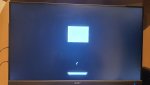
I have a MAG Z790 Tomahawk WIFI DDR4 on the latest BIOS and have installed a ThunderboltM4 8K PCIE card. After a few problems I finally have thunderbolt working for my UAD Apollo x4, but when I enable thunderbolt in the BIOS and restart the startup splash screen graphics are all blank. Same if I try to enter the BIOS, everything is blank and I can't see any text to choose options.
If I reset the BIOS all of the graphics come back, has anyone had similar and fixed this?

 

Attachments

  • 20230119_224335.jpg
    20230119_224335.jpg
    1.7 MB · Views: 307
  • 20230119_222824.jpg
    20230119_222824.jpg
    867.1 KB · Views: 335
Solution
FYI:
It is NVIDIA GTX 900 series and AMD RX 500/AMD RX 400 series graphics card’s limitation that when “Discrete Thunderbolt(TM) Support” option being set as [Enabled] and BIOS under UEFI Mode, BIOS menu would be displayed as white screen. With BIOS CSM Mode, the symptom would not occur. The symptom could be seem with other brand’s GTX 900 series and AMD RX 500/AMD RX 400 series graphics cards.
Please use NVIDIA GTX 1000 series / AMD RX 5000 series graphics card or newer for display compatibility when using ThunderboltM4 8K card on Intel 700, 600 series mainboards.
Hi all,
I have a MAG Z790 Tomahawk WIFI DDR4 on the latest BIOS and have installed a ThunderboltM4 8K PCIE card. After a few problems I finally have thunderbolt working for my UAD Apollo x4, but when I enable thunderbolt in the BIOS and restart the startup splash screen graphics are all blank. Same if I try to enter the BIOS, everything is blank and I can't see any text to choose options.
If I reset the BIOS all of the graphics come back, has anyone had similar and fixed this?
I'll buy this card from you if you still have it along with the two cables:
1 x 16-pin TBT header
1 x USB 2.0 header
 
Back
Top