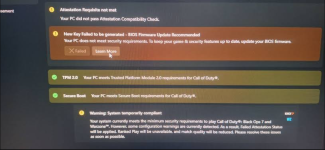
Tech-Support MW4 "TPM attestation is not ready, please upgrade your BIOS"

Troubleshooting

mehmetusta

New member
Joined
Oct 22, 2026
Messages
3
Hello everyone,

I bought MW4 yesterday and unfortunately, after 3 hours of trying, I couldn't fix the TPM issue.
I'm using an AMD 5800X CPU and an MSI X570S Edge WIFI motherboard.
Here is what I've done so far:

  • BIOS is up to date (7D53v1D4)
  • Windows 11 is fully updated
  • Secure Boot: Enabled
  • TPM Device Selection: AMD fTPM
  • Tested with Secure Boot Modeset to Custom – didn't work.
  • Tried Restore Factory Keys under Key Management – didn't work.
  • Checked tpm.msc, and it says "The TPM is ready for use."
  • Tried clearing/resetting the TPM at least 10 times – no luck.
  • msinfo32 details:
    • BIOS Mode: UEFI
    • Secure Boot State: On
    • PCR7 Configuration: Binding Not Possible
  • Performed a Clear CMOS – didn't work.
What else do I need to do? Any help would be appreciated.


Attachments

  • Screenshot 2026-10-22 083818.png
    Screenshot 2026-10-22 083818.png
    436.4 KB · Views: 44
I have the same issue. It can be your TPM version that is being blocked
AMD's official guidance says that TPM firmware versions starting with 3 and ending in .0.*, such as my current version 3.8.0.3, are incompatible with Call of Duty's attestation requirements.
Versions in the 3.*.2.* family and the 6...* family are listed as compatible.
They recommend reaching out to your boards manufacturer to find out if a firmware update is available. Maybe you can also find out if you can get a discreet TPM module, but confirm it with msi support. When you run the Attestation scan, click on learn more or more information
It sucks. I really want to play DMZ
 
MSI Technical Support Team's answer;

Thanks for contacting MSI technical support.

Regarding your concern, bios 7D53v1D4 has updated the TPM firmware, but from your information, your CPU is 5800X. AMD's update plan does not include Summit/Pinnacle CPU. AMD only updates the fTPM firmware of the Matisse/Renoir/Vermeer/Cezanne CPU. If the game fails verification due to outdated firmware, users may need to upgrade their CPU.

However, the cause of this verification issue is currently unknown. Many users online (not just MSI) have encountered this problem with different CPUs, suggesting it might be a game-related issue, but the game developer has not yet provided an explanation.
 
I got the same response but it doesn't make sense that they are recommending CPU upgrades. These CPUs meet the game requirements.
If your Ryzen 7 5800X is supported by AMD's fTPM update plan, the logical next step would be to establish whether your motherboard has actually delivered the compatible firmware. AMD's own guidance says the affected firmware version is 3.x.0.x;
the compatible families are 3.x.2.x and 6.x.x.x.
Were you able to check your firmware version of your TPM?
 
I wouldn't put this on Activision alone. Activision needs to investigate the software/attestation side, but MSI also needs to stop treating CPU replacement as the default answer when users are reporting that the problem persists across different hardware configurations.
 
MSI also needs to stop treating CPU replacement as the default answer

MSI did never do that.
What you need to understand is that your Ryzen 2XXX is not good for TPM 2.0 (and Windows 11).

Now talking about this Activision crap:
If the OS (Windows 11) does not complain about TPM 2.0, a game should never do that!
If it does (this is the Activision's case) it means the game "protection" is bad designed.

And honestly, with so many juniors and amateurs in the software & hardware development, don't expect great results.
In fact you can admire the mess almost everywhere ...
 
Yes I understand what you're saying about my 2nd gen, but the thread's owner has a Ryzen 7 5th gen and MSI also recommended CPU replacement in their response above. That's my point.
 
the thread's owner has a Ryzen 7 5th gen and MSI also recommended CPU replacement in their response above.

That's because AMD (and not MSI) did not provide firmware updates for that CPU (class).
But even so, I don't think it's AMD's fault here.
I already gave you the answer for all this crap.
Again:
If the OS (Windows 11) does not complain about TPM 2.0, a game should never do that!
If it does (this is the Activision's case) it means the game "protection" is bad designed.
 
CPU replacement in their response above. That's my point.
There is a reason

If your BIOS is up to date, as well as all drivers and Windows 11.
It is a software problem or the possibility of faulty hardware.

A few users have reported that swapping the CPU fixes the error, even when swapped for an identical model CPU
As well as some who have swapped out their OS Drive with a different M.2, which also fixed the problem.

And I agree that is one hell of a drastic fix, but after they tried many other steps, this was what worked for them.

Or you may need to lower your security settings
By turning these off
1792763536393.png


However, I would advise against doing so, but it is what Activision wants you to do
I know that, without looking at the Activision site, when they have rolled out a new update, all of a sudden, we have end users whose game was working in the forums saying their game won't work, and they are told it is a BIOS problem
 
There is a reason

If your BIOS is up to date, as well as all drivers and Windows 11.
It is a software problem or the possibility of faulty hardware.

A few users have reported that swapping the CPU fixes the error, even when swapped for an identical model CPU
As well as some who have swapped out their OS Drive with a different M.2, which also fixed the problem.

And I agree that is one hell of a drastic fix, but after they tried many other steps, this was what worked for them.

Or you may need to lower your security settings
By turning these off
View attachment 213215

However, I would advise against doing so, but it is what Activision wants you to do
I know that, without looking at the Activision site, when they have rolled out a new update, all of a sudden, we have end users whose game was working in the forums saying their game won't work, and they are told it is a BIOS problem
I tried core isolation, didn't work - my pc got stuck in a loop. I tried clearing my tpm, updating my BIOS and a bunch of other troubleshooting, but nothing works. I am still convinced that it might be the TPM firmware version. I am getting a new board and CPU so will see if it makes any difference
 
This worked for me. After upgrading to a Gigabyte A520M K V2 with a Ryzen 5 5500, my system passed the Call of Duty Secure Attestation Wizard.

The main detail I think is worth paying attention to is the AMD fTPM firmware version. My previous system had version "3.8.0.3", while the new system has "3.95.2.5". According to AMD's PA-420 advisory, these versions fall into different firmware families, with "3.*.0.*" identified as affected and "3.*.2.*" identified as unaffected.

TPM 2.0 and Secure Boot were enabled, but the firmware version may also be an important factor in whether the attestation check passes.
 
This worked for me. After upgrading to a Gigabyte A520M K V2 with a Ryzen 5 5500, my system passed the Call of Duty Secure Attestation Wizard.


The main detail I think is worth paying attention to is the AMD fTPM firmware version. My previous system had version 3.8.0.3, while the new system has 3.95.2.5. According to AMD's PA-420 advisory, these versions fall into different firmware families, with 3.*.0.* identified as affected and 3.*.2.* identified as unaffected.


TPM 2.0 and Secure Boot were enabled, but the firmware version may also be an important factor in whether the attestation check passes.
 
Back
Top