PC sometimes won't wake up from sleep mode, red + yellow lights on MB

hupimies2151a02d0

New member
Joined
Sep 22, 2024
Messages
6
Board: X670E Tomahawk WIFI
BIOS: 7E12v1E
GPU: AsRock RX 7900 XT Phantom Gaming OC
CPU: Ryzen 7 7800X3D
Cooler: Noctua NH-D15
RAM: 2x16GB Corsair Vengeance 6000MHz
SSD: Samsung 2TB 990 PRO
PSU: Corsair 850W RM850x
SYS: Windows 11 Home x64 Ver. 10.0.22631

About 7/10 times the pc wakes up normally from sleep mode, during which red and yellow light on motherboard (CPU, RAM) flash. 3/10 times the lights light up for about 30 seconds, after which they turn off about the same time. After this only black screen, USB devices get power (leds on mouse light up, not on keyboard) but no other connection. Have waited for over 30 minutes, no change. Always gets fixed by forced shutoff via holding down the power button, after this boots up to saved state (previous applications open etc.) No problems on regular startup.

Worked normally for about a year, problem started a few months ago suddenly. Didn't disconnect or open up the PC / download any software / do anything else notable which could have caused system change. All temps during benchmarks normal and no problems during running. PC has never crashed etc.

List of things that have not fixed the problem:

Updated BIOS
Reset BIOS settings through BIOS menu, haven't cleared CMOS with jumping
Updated GPU drivers
Updated Windows from 10 to 11
Reset Windows power settings through troubleshooting
Turned off fast startup
Unplugged and reconnected PSU (also removed and reconnected GPU, didn't try to boot without it)
RAM are in slots A2 and B2 per the manual, as they have always been

Not a huge problem, but very annoying since I primarily keep PC in sleep mode. Also have to think that constant forced shutoff doesn't do the PC any favors. Any thoughts on possible fixes? Could clearing CMOS have any other effect than resetting through the BIOS menu does?
 
@MadSky
lol, wut?
i can buy 2 nand drives (one for backup data) for less than cloud service with 1TB size will cost, unless you only use it for 1y, local storage incl backup drive is
cheaper and easier, all while able to use without internet/data.
not even talking about the fact that online storage is at much higher risk for trouble, than storing (important) data on another (disconnected) drive..
 
To all those saying they think sleep/hibernation is a bad idea, just because you don't like it, doesn't mean the rest of us has to stop using it. We have different use cases. PC sleep/hibernation were invented for a reason. And you can't deny the fact that there is a problem somewhere that is preventing users from using sleep/hibernation. A bug is a bug. Just because it's not used by 100% of users, it does not mean it should just be ignored.
 
@rainai
saying its a bug doesnt make it so.
a quick web search shows nothing recent except some that are already "solved", same for checking a handful of forums im in for hw/support,
so until you can provide facts,...
just because something exists, doesnt mean its always recommended to use it, hibernation being unsupported on almost all desktops in near future is just proof of that,
same for things like spread spectrum setting..

@MadSky
i dont have a problem with some ppl using it, for a case where it makes sense.
what i do have a problem with is ppl not doing a couple of basic troubleshooting things, incl swapping psu, to exclude things, some not even interested in responding if the system
does power up/down/work (stable) outside of standby use etc, all while standby isnt something that affects perf or life expectancy.
 
Waldorf, in case you missed this title:

PC sometimes won't wake up from sleep mode, red + yellow lights on MB​

If anyone thinks "Sleep" is a bad/useless technology, good for them! Now let those who do care, discuss this matter here. Thank you.
 
Last edited:
I was also sharing my long experience on pc building: sleep mode has NEVER been a reliable feature to use without surprises, and more than often it just stops working all of a sudden
you update something and bam, sleep not working anymore, feel lucky if you haven't lost any precious document/work or corrupted a mechanical hard drive (yes, it happened to me)
it's the sad truth

it can be anything: the bios, a device firmware, a driver version, a software, a windows update
Even amd released a driver with a specific fix for the sleep mode few months ago

AMD S0i3 Filter Driver1.0.0.171.0.0.19Fix for system unable to wake up the from s0i3 on Windows 11.

but that maybe was specific to be compatibile with some previous agesa versions, who knows if recent agesa updates have broken things again

I don't have any hate for the sleep mode. I like the sleep mode on my laptop or on the PS5: it's very useful and, more importantly, most of the time works well and it's less prone to kind of bug (cause laptops and ps5 have less variables in general). It's a killer feature on those scenarios, but something to avoid on a desktop pc whenever possible
If you really need it I suggest to disconnect every device, usb drives/hubs/fan controllers/audio interfaces in particular, do a clean windows installation (on another ssd if you don't want to clean your actual disk)
no bloat, no additional softwares, update manually all the drivers to the latest version... and check if that changes anything for you

if not, start asking on amd subreddit, maybe it's something related to amd drivers and somebody else will confirm the problem
agesa and chipset drivers are amd competence, and most likely it's where the problem resides
but again, as I said before, no surprise if it's something else
 
Last edited:
@mh3marefa157602e1
i didnt, but as so far havent seen only 2 trying my suggestion of running (bios) at stock settings and see if it works (for a few weeks),
all while some "hijack" the thread for their problem (without having identical setup).

troubleshooting things in an orderly way to exclude/confirm them as being the issue, is getting things done much quicker, than randomly messing with bios settings, incl things like undervolting with curve optimizer past 10/15 (depending on sample), ignoring some even run ryzen hw on an unsupported OS (win 7).
do a quick websearch on how many power up/down problems alone can stem from a "problematic" psu, or (almost) empty cmos battery, and see how many here, have swapped those (to exclude as cause)?

@Michele P
like i said earlier, if this was a general driver/fw/sw/setting issue, it would be more widespread, but its not.
 
it is widespread indeed, even on something that isn't properly a desktop pc
like rog ally for example, because it is based on recent amd hardware
but that was also fixed by an amd driver

one thing is to fix something on a "closed environment" device
totally different thing fix the same on a desktop pc
 
Waldorf, People already tried what MSI suggested (clear CMOS -> enable XMP/EXPO -> enable MCR) to solve this problem to no avail. All are on AM5 platform as well, so no one has hijacked this discussion. You on the other hand are on AM4 hardware, are against sleep tech, denying other peoples' reports, clearing AMD of all wrongdoing, and basically I have no idea why you are even here TBH.

I've seen far more reports of boot instability/sleep/reboot problems on AM5 than reports of burnt X3D CPUs that if you recall were happening for some users 1 year ago. Although reports were scarce, that issue indeed existed and a BIOS fix was released for it quickly. By your logic, if AMD had completely ignored those burnt CPU reports because they were not "widespread", imagine what would've happened today! It would be hundreds of thousands of burnt CPUs.
 
Searching through various vendor forums you will find people struggling with sleep problems, I am certain of this

However, only a few may encounter this issue, as not everyone experiences the same bug.
Moreover, it's primarily because only a minority of those using this hardware utilize sleep or any advanced power-saving features.
On the contrary, the vast majority even disable idle and similar features, and it's less likely to notice that this feature is broken.

Only in certain specific use cases the issue become more evident, resulting in higher number of reports
For example search for rog ally sleep problems I mentioned before, that's an amd based portable console affected by the same type of bug (if not exactly the same)
You will find MANY reports

My suggestion remains the same: disconnect everything (usb/hub/disks/audio), do a clean windows installation on a different disk, no bloatware and add manually only the most recent drivers. Check if sleep it's working with more consistency on this clean windows.

You could also try also with an older bios, maybe something released before the amd driver that addressed the sleep bug

For example,
driver with fix is from February 2024
bios with agesa 1.0.0.7c is from August 2023 (before the driver release)
I think it's a good combo to test, but only if sleep is something critical for you and want to try everything.
 
Last edited:
In my case the issue has been apparently resolved (after 4 days of testing) by setting manually all timings and voltages for RAM, computer now goes to sleep and wake up every time since then. Before it wouldn't go more than a day before I had to press the reset button for the PC to start. I would recommend everyone to give this a try.
 
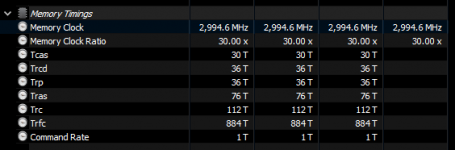
What RAM do you have? and which voltages did you set manually? Can you post a screenshot of Zentimings?
1732735653540.png
 
Do you have PBO enabled or disabled?
PBO negative 25 all cores and +200 boost

What RAM do you have? and which voltages did you set manually? Can you post a screenshot of Zentimings?
View attachment 195721
UPDATE: After 6 days and sending it to sleep it has happened again, only once, just right now. I don't know if it was luck or what but now I am going to try with MCR and Auto power down enabled (they were both in auto). The memory is rated for 1.4V but I put it in 1.350V and it's completely stable, besides the sleep issue of course. I am starting to think it could be related to that time they had to decrease the voltage to the CPU due to chips burning and melting...
 

Attachments

  • Captura de pantalla 2024-11-29 160226.png
    Captura de pantalla 2024-11-29 160226.png
    44.5 KB · Views: 227
  • Captura de pantalla 2024-11-29 160216.png
    Captura de pantalla 2024-11-29 160216.png
    14.5 KB · Views: 204
So far with MCR and PDE it's been 5 days with no issues so far, even if it is not the final solution the amount of times the computer does not wake up from sleep has definitely decreased. Unless it's just plain luck for the past 11 days (it just to not boot from sleep at least once every 30 hours or so before). Will keep reporting.
 
I thought I was going crazy, and really started to consider to buy a new PC until I today thought maybe googling the issue first is a better approach. Then i found this topic and the other topic about someone with almost the exact same configuration and the same issues...

I have for years put my (previous) desktop PCs in sleep mode and never had any issues until i bought this configuration.

MSI MAG B650 Tomahawk WiFi with an AMD Ryzen 7 7600X and DDR5-6000 configuration.
I must say in the beginning I had less issues but recently it is almost happening every day that it will not wake up from sleep mode.
I have the latest bios installed and, looking back, I think most of the issues started since the previous time I updated the bios.

I will try above tips of manually setting EXPO and MCR settings, but also hope MSI will look into this, as this is not normal and also desktop PC's should be able to wake up fine from sleep mode.
 
I thought I was going crazy, and really started to consider to buy a new PC until I today thought maybe googling the issue first is a better approach. Then i found this topic and the other topic about someone with almost the exact same configuration and the same issues...

I have for years put my (previous) desktop PCs in sleep mode and never had any issues until i bought this configuration.

MSI MAG B650 Tomahawk WiFi with an AMD Ryzen 7 7600X and DDR5-6000 configuration.
I must say in the beginning I had less issues but recently it is almost happening every day that it will not wake up from sleep mode.
I have the latest bios installed and, looking back, I think most of the issues started since the previous time I updated the bios.

I will try above tips of manually setting EXPO and MCR settings, but also hope MSI will look into this, as this is not normal and also desktop PC's should be able to wake up fine from sleep mode.
It's not only MSI but Gigabyte also, and who knows what other vendor. My issue seems to have been fixed. I have MCR and Power down both on ENABLED and have set the timings and voltages manually, it has been over a week now with waking up from sleep normal. The only additional factor is I sold my 4080 super half way through and now I am with integrated CPU graphics so I don't know if that could be doing something too...try and let us know!
 
It's not only MSI but Gigabyte also, and who knows what other vendor. My issue seems to have been fixed. I have MCR and Power down both on ENABLED and have set the timings and voltages manually, it has been over a week now with waking up from sleep normal. The only additional factor is I sold my 4080 super half way through and now I am with integrated CPU graphics so I don't know if that could be doing something too...try and let us know!

If your PSU was struggling then removing the 4080 Super might have alleviated that. You'd need to put a 4080 Super back in to be sure.

Maybe others can try taking their GPU out and switch to iGPU for a while (or just for 15 minutes of repeated sleeping/waking).

When you say you "set the timings and voltages manually" do you mean you manually copied the settings from the EXPO/XMP profiles identically?
 
If your PSU was struggling then removing the 4080 Super might have alleviated that. You'd need to put a 4080 Super back in to be sure.

Maybe others can try taking their GPU out and switch to iGPU for a while (or just for 15 minutes of repeated sleeping/waking).

When you say you "set the timings and voltages manually" do you mean you manually copied the settings from the EXPO/XMP profiles identically?
I had a 4070 before so no, that is not the reason. My PSU is Corsair gold 850w. This is related to the EXPO and XMP profiles and voltages.
 
Back
Top