duchac.domini15a002df
New member
- Joined
- Jul 1, 2026
- Messages
- 3
Hi everyone,
I'm running into a very strange issue that I've been troubleshooting for several days now without success.
As soon as I enable Secure Boot, Windows never reaches the login screen.
The boot sequence is always:
MSI logo → black screen
The PC does not freeze:
- Num Lock/Caps Lock still respond.
- Ctrl+Alt+Del appears to work.
- It simply never displays anything after the MSI logo.
If I install the GTX 1080:
- Secure Boot works perfectly.
- Windows boots normally.
- No black screen.
The problem only exists with the RTX 3070.
Kernel-Boot Event ID 124
- Gigabyte RTX 3070 Gaming OC
- VBIOS: 94.04.25.80.46
- Appears to be a non-LHR model.
The original sticker on the graphics card is unfortunately missing, so I cannot verify the hardware revision physically.
- a compatibility issue between the MSI H270 UEFI implementation and this specific RTX 3070 VBIOS,
- or some interaction between Secure Boot and the RTX 3070 firmware.
Could this be caused by:
- an outdated motherboard BIOS?
- the RTX 3070 VBIOS?
- Secure Boot certificates stored in the GPU firmware?
- something specific to MSI H270 boards?
At this point I'm honestly running out of ideas.
Any suggestions would be greatly appreciated.
Thank you!
I'm running into a very strange issue that I've been troubleshooting for several days now without success.
My hardware
- Motherboard: MSI H270 Mortar Arctic (MS-7A69)
- BIOS: E7A69IMS.B60 (07/02/2018)
- CPU: Intel i7-7700K
- RAM: 64 GB DDR4
- GPU: Gigabyte RTX 3070 Gaming OC 8GB
- PSU: Seasonic Focus GX-750 Gold (750W)
- OS: Windows 10 Pro x64 (UEFI/GPT)
The problem
With Secure Boot disabled, everything works perfectly.As soon as I enable Secure Boot, Windows never reaches the login screen.
The boot sequence is always:
MSI logo → black screen
The PC does not freeze:
- Num Lock/Caps Lock still respond.
- Ctrl+Alt+Del appears to work.
- It simply never displays anything after the MSI logo.
Important observation
I still own my old GTX 1080.If I install the GTX 1080:
- Secure Boot works perfectly.
- Windows boots normally.
- No black screen.
The problem only exists with the RTX 3070.
Tests I've already performed
- - Cleared CMOS.
- - Installed a brand new CMOS battery.
- - Loaded BIOS defaults.
- - Re-enrolled the factory Secure Boot keys.
- - Verified UEFI boot.
- - Rebuilt Windows boot files using bcdboot.
- - Used DDU in Safe Mode to completely remove all NVIDIA drivers.
- - Tested booting Windows with only Microsoft Basic Display Adapter.
- - Tried both DisplayPort and HDMI.
- - Tested different monitors.
- - Booted an Ubuntu Live USB with Secure Boot enabled.
- - Ubuntu boots perfectly with Secure Boot enabled.
- - Windows Boot Manager looks correct.
- - Secure Boot keys appear to install correctly.
Event Viewer
The only recurring event I can find is:Kernel-Boot Event ID 124
I'm not sure whether this is related or just a side effect.The virtualization-based security enablement policy check at phase 7 failed with status: 0xC0000405
GPU information
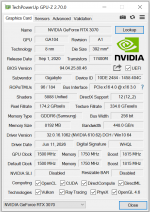
GPU-Z reports:- Gigabyte RTX 3070 Gaming OC
- VBIOS: 94.04.25.80.46
- Appears to be a non-LHR model.
The original sticker on the graphics card is unfortunately missing, so I cannot verify the hardware revision physically.
What makes this even stranger
- - Secure Boot itself clearly works.
- - Ubuntu boots fine.
- - GTX 1080 boots fine.
- - Only Windows + RTX 3070 fails.
- a compatibility issue between the MSI H270 UEFI implementation and this specific RTX 3070 VBIOS,
- or some interaction between Secure Boot and the RTX 3070 firmware.
My questions
Has anyone ever seen something like this before?Could this be caused by:
- an outdated motherboard BIOS?
- the RTX 3070 VBIOS?
- Secure Boot certificates stored in the GPU firmware?
- something specific to MSI H270 boards?
At this point I'm honestly running out of ideas.
Any suggestions would be greatly appreciated.
Thank you!