Secure boot violation invalide signature detected

nathsmorea157202e0

New member
Joined
Jun 30, 2026
Messages
2
Hey guys,

It is the first time I post on a forum so don't hesitate to ask questions or ask for more details if I didn't give them.

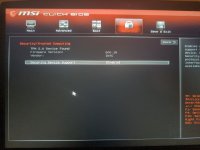
It started a few minutes ago, I tried to play league of legends like always and the anti heat vanguard told me that the tpm 2.0 was not activated on my pc and told me to activate it in the bios. When I went into the bios i realized that the security device support was already enabled so I pressed F10 to save and exit.

The PC restarted but then a pop up : Secure boot violation, invalide signature detected.
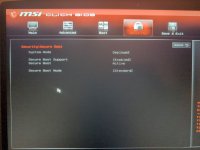
I tried to watch every tutos on YouTube and reddit but none of them worked. The only this I could not do was to disable the secure boot as it was greyed and I could not disable it...

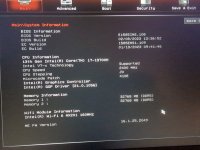
I also did not check my bios update as I have only one pc and am too scared to touch something directly in the bios who will erase all my data.


I have a motherboard MSI ms-1585
As for my CPU I have a Intel i7-13700h

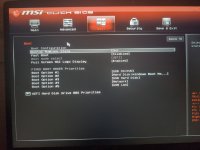
I will take a photo of everything and put it in the files.

I hope someone can help me. Than you in advance
 

Attachments

  • 17828139510045801679051702960177.jpg
    17828139510045801679051702960177.jpg
    1.6 MB · Views: 219
  • 17828139790188549130431272125784.jpg
    17828139790188549130431272125784.jpg
    1.3 MB · Views: 215
  • 17828139917163185669066117258188.jpg
    17828139917163185669066117258188.jpg
    1.3 MB · Views: 202
  • 17828140305943759946112789220313.jpg
    17828140305943759946112789220313.jpg
    1.8 MB · Views: 206
Hello,

As we are in June, your Certificate of Secure Boot is probably expired and the only way after being stuck like you is to Flash your Bios to the New version.
Most of the times you can Disable Secure Boot and boot Windows normally but you says it's not possible so, this is the way i recommend.
For best security i recommend you foillow guides of M-Flash utility and plug in your Power Supply before to proceed.

Select the exact model of your hardware :
https://www.msi.com/Laptop/Katana-15-B13VX/support?sub_product=Katana-15-B13VGK
Look on BIOS category and see if you can find Recents Bios

- You will need an empty Flash USB Key formatted in FAT32.
Extract the Bios in root of your USB key
Plugin your USB Key to the Laptop
Enter your BIOS of your Motherboard and go to proceed to the Update

If i'm right, your Secure Boot Certificate will be updated and you will be able to Boot windows again like things never happened.
It worked thank you so much I was so scared of loosing all my files. Thank you so much have a great day !
 
Back
Top