yelnikitos
New member
- Joined
- Oct 9, 2026
- Messages
- 2
Hello,
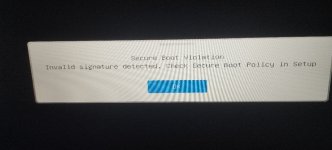
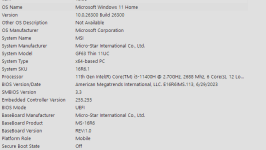
I'm having a "Secure Boot violation" issue on my MSI Thin GF63 11UC and can't seem to get past it.
Some background: a while ago, right before the old Windows 11 Secure Boot certificates expired (which started asking for BitLocker recovery keys on every single reboot), I turned off disk encryption for C: and D: drives and disabled Secure Boot altogether.
Now I'm trying to turn Secure Boot back on (Windows 11 is fully updated). But as soon as I enable it in BIOS, I just get "Secure Boot violation" on startup.
Here is what I've tried so far:
- - Updated BIOS to E16R6IMS.113 and re-flashed it again.
- - Ran the MSI certificate update script following their guide (FAQ 11370).
- - After re-flashing BIOS and applying the certificate updates, Vendor Keys finally changed to "Valid". However, Secure Boot still failed with the same violation error.
- Since it didn't work, I tried clicking "Install all factory default keys" again, which flipped Vendor Keys back to "Modified".
-