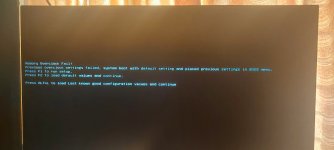
Greetings all, I'm hoping someone can help me with a real frustrating problem. Any time I touch any overclock related settings in the BIOS I get the following message often when my PC attempts to post:
"All settings were reset to default values.
The previous overclock settings have failed, system has been restored to it's default settings.
Press F1 to enter setup.
Press F2 to load default values and continue.
Press DEL and wait for 5 seconds to enter BIOS setup or press F1/F2 to enter BIOS setup immediately.
Press Alt+L to load last known good configuration values and continue"
The settings I used were obtained after viewing the MSI 9900k overclocking video guide: Link
I have also enabled the XMP profile for my memory
Relevant PC specs:
CPU: Intel i9 9900k
Motherboard: MSI Z390 Godlike
Memory: Corsair Dominator 4 x 8GB rated at 3200 Mhz, 14-14-14-34 timings
CPU Cooler: Corsair H115i Platinum
Power supply: Corsair AX1000 Titanium
GFX Card: MSI 2080 Ti Gaming X Trio
When I get this message I hit F1 to enter BIOS and my settings aren't actually reset like the message says they are. I then save and reboot and the PC will then POST just fine. This message pops up when ever I restart, cold boot or come out of hibernate. Sometimes my PC will post with out this error message but it happens more times then not, I'd guesstimate between 75-90% of the time
I don't feel my system is unstable. I have been able to run stress tests and play resource intensive games with the settings this message is telling me have failed. Temps on the CPU never go over 90 for stress tests or 75 for games (with 65 being the mean).
Things I have done to try to troubleshoot this issue:
1.) Gone through two motherboards, all Z390 Godlikes
2.) Gone through 3 different processors all i9 9900ks
3.) Gone through 3 memory kits (first was two 2x8GB kits, second was a 4x8GB kit, third was a 4x8GB kit with higher specs, all Corsair Dominator)
4.) Tested on another power supply (Corsair AX 860i)
5.) Attempted CPU overclock without XMP enabled
6.) Attempted XMP without CPU overclock enabled
7.) Tried with Vcore voltage in the range of 1.300-1.3800
8.) Set the CPU ratio to 36x and left everything else at default
9.) Manually set memory rated specs with and without overclocking the CPU
10.) Tried various LLC settings
11.) Tried different Voltage modes (adaptive and offset)
12.) Tested memory with Memtest for 8-10 hours 3 different times (no errors)
13.) Reset CMOS
14.) Updated BIOS to the latest version
Things I haven't tried:
1.) Any Bios setting not listed above
2.) Use different memory configurations (1x4, 2x4)
If I leave everything at their default values system works just fine. I know that all this effort is netting me about a 5% increase in FPS but at this point it's more of a principal thing. I enjoy overclocking even though I'm a novice and it's part of the enjoyment of buying high end parts. I'm looking to get into custom watercooling but I want to get this issues sorted out before I dive into that.
I'm at my wits end with this error. With all the hardware I've gone through and tested and I am pretty confident it isn't a faulty part. It must be some issue with my configuration although I feel this wouldn't be an uncommon one for someone who wants to put together a higher end Z390 build. Other than that maybe just a bad firmware on MSI's part? I don't want to give up on this board but if I can't get this resolved that's what I'm going to do. If anyone has any ideas I could try to resolve this I would be grateful. Thanks you for reading if you made it this far.